| 6.23. 이미지 창 제목표시줄과 상태표시줄 | ||
|---|---|---|

|
6. Preferences Dialog |  |
| 6.23. 이미지 창 제목표시줄과 상태표시줄 | ||
|---|---|---|
|
|
6. Preferences Dialog | |
그림 15.94. 이미지 창 제목표시줄과 상태표시줄 형식
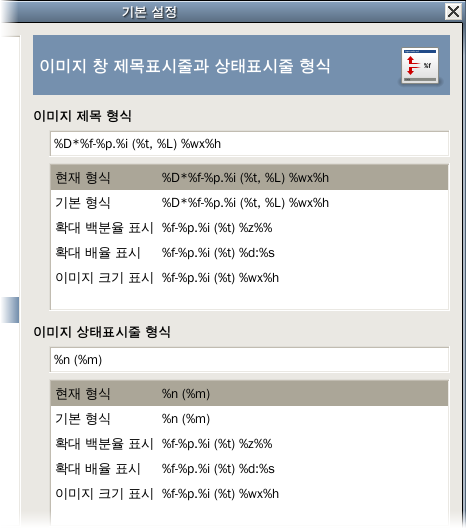
이 페이지에서는 이미지 창의 제목 표시줄과 상태 표시줄에 표시되는 정보의 종류를 설정할 수 있습니다. 제목 표시줄은 이미지 창의 상단에 표시되지만, 창 관리자에 따라 다를 수 있습니다. 상태 표시줄은 이미지 창의 우측 아래쪽에 표시됩니다. 이에 대한 더 자세한 사항은 이미지 창 섹션을 참고하십시오.
You can choose among several predesigned formats, or you can create one of your own, by writing a format string in the entry area. Here is how to understand a format string: anything you type is shown exactly as you type it, with the exception of variables, whose names all begin with “%”. Here is a list of the variables you can use:
| 변수 | Meaning |
|---|---|
| %f | Bare filename of the image, or “Untitled” |
| %F | Full path to file, or “Untitled” |
| %p | 이미지 id 번호(유일함) |
| %i | 보기 번호, 이미지가 여러 창에 표시될 때. |
| %t | 이미지 유형 (RGB, grayscale, indexed) |
| %z | 확대/축소 비율(퍼센트) |
| %s | 원본에 대한 대상의 비율 (확대/축소 단계 = %d/%s) |
| %d | 대상에 대한 원본의 비율 (확대/축소 단계 = %d/%s) |
| %Dx | 이미지가 수정되었을 경우 x 를 표시합니다. |
| %Cx | 이미지가 수정되지 않았을 경우 x 를 표시합니다. |
| %l | The number of layers |
| %L | 레이어 수 (자세히) |
| %m | 이미지의 메모리 사용량 |
| %n | 활성화된 레이어/채널명 |
| %o | Name of the color profile |
| %P | 활성화된 레이어/채널 id |
| %w | 이미지 너비(픽셀) |
| %W | 이미지 너비(실생활에서 쓰는 단위) |
| %h | 이미지 높이(픽셀) |
| %H | 이미지 높이(실생활에서 쓰는 단위) |
| %u | 단위 기호 (예. Pixel 은 px) |
| %U | 단위 약호 |
| %x | Active layer width in pixels |
| %X | Active layer width in real-world units |
| %y | Active layer height in pixels |
| %Y | Active layer height in real-world units |
| %% | A literal “%” symbol |

