This plug-in lets you play an animation from a multi-layers image. GIMP supports several formats that allow you to export an animation, e.g. webp, gif and mng. In addition to that, GIMP supports loading (but at this time not exporting) apng images. Regular multi-layer formats like GIMP's own XCF as well as PSD, TIFF and PSP also allow you to use multiple layers that can be interpreted by this animation player as an animation.
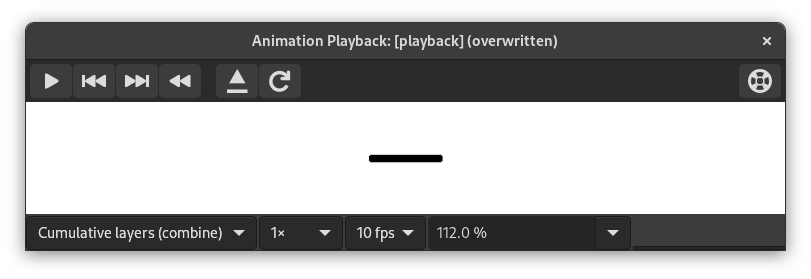
This dialog has:
- Predogled
-
The center of the Playback dialog is taken up by a preview of the animation that automatically fits to the frame size. The number of the displayed frame as well as the total number of frames is shown below the preview next to the player controls.
- Drop-down lists at the top
-
The following drop-down lists and controls are available above the preview:
- Combine/Replace layers
-
This can be to show all frames so far on top of each other, or to show only the last frame.
- Default framerate
-
This allows you to set the number of frames per second used when playing the animation.
- Playback speed
-
This allows you to set the speed of the animation.
- Zoom
-
This allows you to set the zoom level of the animation.
- Player Controls at the top right
-
-
 Reload the image
-
This loads the animation again, useful if changes have been made.
-
 Detach the animation from the dialog window
-
This detaches the animation from the window.
-
 Help
Help
-
Show this documentation for Animation Playback.
-
- Player Controls at the bottom
-
The following controls are available below the preview:
-
 Start playback/Stop playback
-
This plays or stops the animation.
-
 Step back to previous frame
-
This plays the animation backwards step by step.
-
 Step to next frame
-
This plays the animation step by step.
-
 Rewind the animation
-
This rewinds the animation to the beginning.
-


