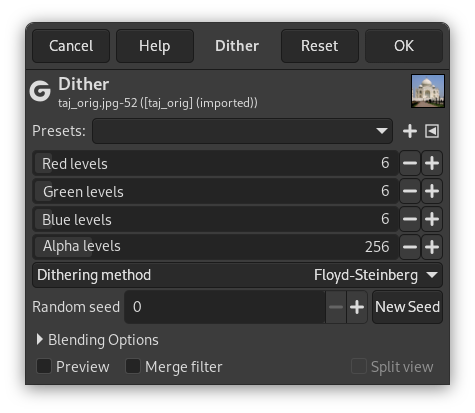
This filter can reduce the number of colors in an image by reducing the levels per channel (colors and alpha). Different dithering methods can be specified to counteract quantization induced banding.
- Önayarlar, Girdi Türü, Kırpma, Harmanlama Seçenekleri, Ön izleme, Süzgeci birleştir, Bölünmüş görünüm
-
![[Not]](images/note.png)
Not These options are described in Kısım 8.1.2, “Renkler Ortak Özellikler”.
- Kırmızı düzeyleri, Yeşil düzeyleri, Mavi düzeyleri, Alfa düzeyleri
-
These sliders allow you to set the number of levels for the respective red, green, blue and alpha channels.
- Titreme yöntemi
-
Here you can specify the dithering method to use.
- Hiçbiri
-
No dithering will be performed on the image.
- Floyd-Steinberg
-
This is the most commonly used method of dithering and the default for this filter. For more information see Floyd–Steinberg dithering on Wikipedia.
- Bayer
-
The Bayer Matrix is another common method of dithering used to reduce the number of colors. The algorithm is characterized by noticeable crosshatch patterns in the result. For more information see Ordered dithering on Wikipedia.
- Rastgele, Rastgele Eşdeğişken
-
These methods of dithering use randomization of the pixel values to reduce the number of colors.
- Aritmetik ekle, Aritmetik ekle eşdeğişken, Aritmetik veya, Aritmetik veya eşdeğişken
-
These methods of dithering are spatially stable, based on magic numbers and arithmetic. For more information see a dither.
- Mavi Gürültü, Mavi Gürültü Eşdeğişkeni
-
These dithering methods using so-called blue noise have been found to be the least unsightly and distracting. For more information see Dithering in image processing on Wikipedia.
- Rastgele parçacık, Yeni Parçacık
-
This option controls the randomness of the filter. The Random seed box lets you manually enter a seed for the randomization algorithm used. You can also generate a random seed by pressing the button. If the same random seed is used in the same situation, the filter produces exactly the same results. A different random seed produces different results.


