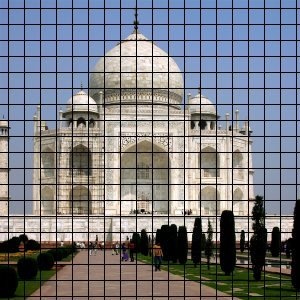
It renders a Cartesian grid on the active layer, on top of the existing contents. The width, spacing, offsets, and colors of the grid lines can all be set by the user. By default, the lines are black.
![[Sugerencia]](images/tip.png)
|
Sugerencia |
|---|---|
|
By setting a grid line width to 0 you can disable showing that type of line (horizontal, vertical, intersection). |
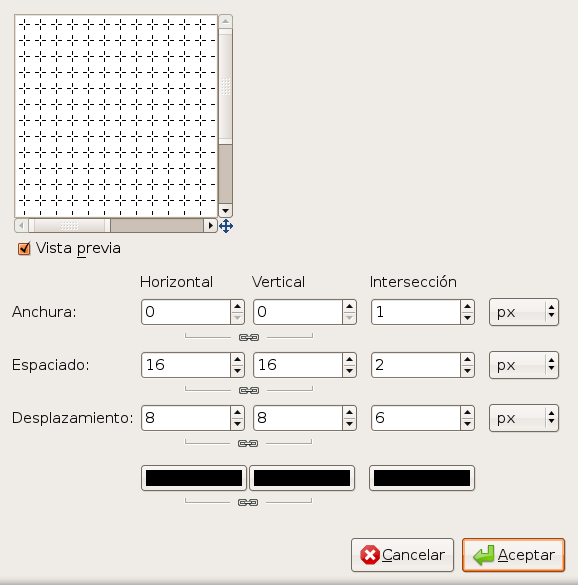
There are separate options for controlling horizontal grid lines, vertical grid lines, and intersections. By default, the horizontal and vertical settings are synchronized, so that all changes are applied symmetrically. If you want to change just one of them, click on the “chain” symbol below it to disable the synchronization.
For each of the first three sets of parameters you can select the unit of measurement for the values you enter. By default pixels is used.
- Horizontal width, Vertical width, Intersection width
-
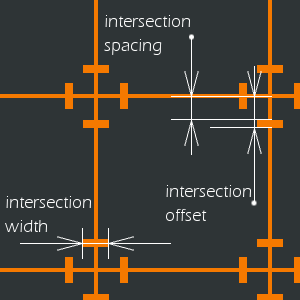
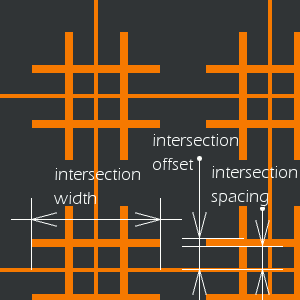
Sets the thickness of the grid lines for horizontal, vertical and intersection lines respectively. By default, horizontal and vertical thickness is synchronized, which you can disable by toggling the chain symbol.
- Horizontal spacing, Vertical spacing, Intersection spacing
-
Establece la distancia entre las líneas de la rejilla. El parámetro Intersección limpia el espacio entre el punto de intersección y el final de los extremos de las cruces de la intersección.
- Horizontal offset, Vertical offset, Intersection offset
-
Sets the starting offset for grid lines relative to the upper left corner. For intersections, sets the length of the arms of the intersection crosses.
- Selectores de color
-
The color selectors allow you to change the color of the horizontal, vertical and intersection grid lines separately. Click a color selector button to select a different color. By default, horizontal and vertical line colors are synchronized, which you can disable by toggling the chain symbol.