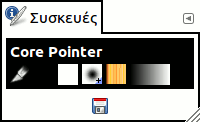
Αυτό το παράθυρο συγκεντρώνει τις τρέχουσες ρυθμίσεις εργαλείων για κάθε μία από τις συσκευές εισόδου σας: το ποντίκι (με όνομα «Virtual Core pointer»), τις πινακίδες σχεδίασης (συνήθως εμφανίζονται ως δύο συσκευές: ένα στυλό και μια γόμα) ή άλλες συσκευές κατάδειξης.
Για κάθε συσκευή εμφανίζονται πολλά εικονίδια που αντιπροσωπεύουν τις τρέχουσες ρυθμίσεις: το ενεργό εργαλείο, τα χρώματα προσκηνίου και παρασκηνίου, καθώς και το ενεργό πινέλο, μοτίβο και διαβάθμιση για τη συγκεκριμένη συσκευή. Πατώντας σε ένα εικονίδιο ενός από τους πόρους, θα ανοίξει το παράθυρο διαλόγου του, το οποίο σας επιτρέπει να αλλάξετε τον ενεργό πόρο. Μπορείτε να σύρετε και να αποθέσετε στοιχεία από αυτό το παράθυρο διαλόγου στο παράθυρο εικόνας.
Ορισμένοι χρήστες προτιμούν όλες οι συσκευές να μοιράζονται τις ίδιες ρυθμίσεις εργαλείου. Αυτό είναι δυνατό αλλάζοντας τη ρύθμιση Κοινή χρήση εργαλείου και επιλογών εργαλείου μεταξύ συσκευών εισόδου στην καρτέλα Συσκευές εισόδου του παραθύρου διαλόγου Προτιμήσεις.
![[Σημείωση]](images/note.png)
|
Σημείωση |
|---|---|
|
Υπάρχει ένα γνωστό πρόβλημα στα Windows που προκαλεί την αδυναμία εναλλαγής μεταξύ συσκευών. Αυτό σημαίνει ότι όλες οι αλλαγές στις ρυθμίσεις εμφανίζονται στις ρυθμίσεις της συσκευής Εικονικός δεικτης πυρήνα (Virtual Core Pointer). |
Το πλήκτρο
 στο κάτω μέρος του παραθύρου εκτελεί την ίδια ενέργεια με το πλήκτρο στην ενότητα Συσκευές εισόδου των προτιμήσεων.
Αυτός ο διάλογος είναι ένας προσαρτήσιμος διάλογος· δείτε την ενότητα Τμήμα 2.3, «Διάλογοι και προσάρτηση» για βοήθεια στο χειρισμό του.
-
Από το κύριο μενού: → → .
-
Από το μενού καρτέλας σε οποιοδήποτε διάλογο: →


