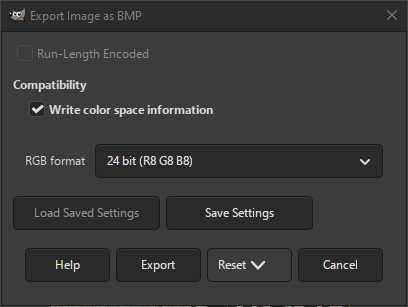
The BMP file format is a raster image format. It is most often used on Windows.
- Run-Length Encoded
-
When checked, run-length encoding will be used to compress the image data. This setting is only available for 4- and 8-bit indexed and grayscale images. For other formats it is disabled.
- Write color space information
-
By default, GIMP writes color space information, but not all programs can read BMP images that have this data included. This setting allows you to disable writing the color space information.
- RGB format
-
This setting determines the export format for RGB images. It is disabled for indexed and grayscale images. The following choices are available:
- 16 bit (R5 G6 B5)
-
Pixels are written using 16 bits: 5 red bits, 6 green bits and 5 blue bits.
- 16 bit (A1 R5 G5 B5)
-
Pixels are written using 16 bits: 1 alpha bit, 5 red bits, 5 green bits and 5 blue bits.
- 16 bit (X1 R5 G5 B5)
-
Pixels are written using 16 bits: 1 undefined bit, 5 red bits, 5 green bits and 5 blue bits.
- 24 bit (R8 G8 B8)
-
Pixels are written using 24 bits: 8 red bits, 8 green bits and 8 blue bits.
- 32 bit (A8 R8 G8 B8)
-
Pixels are written using 32 bits: 8 alpha bits, 8 red bits, 8 green bits and 8 blue bits.
- 32 bit (X8 R8 G8 B8)
-
Pixels are written using 32 bits: 8 undefined bits, 8 red bits, 8 green bits and 8 blue bits.


