X BitMap (XBM), is a plain text image format that was mainly used for cursors and icon bitmaps in the X GUI. This format was superseded by X PixMap.
This format only supports exporting as black and white monochrome images. GIMP only supports exporting to this from 8-bits per channel images.
Due to being stored in the form of C source files, this format can take up more space than other binary formats.
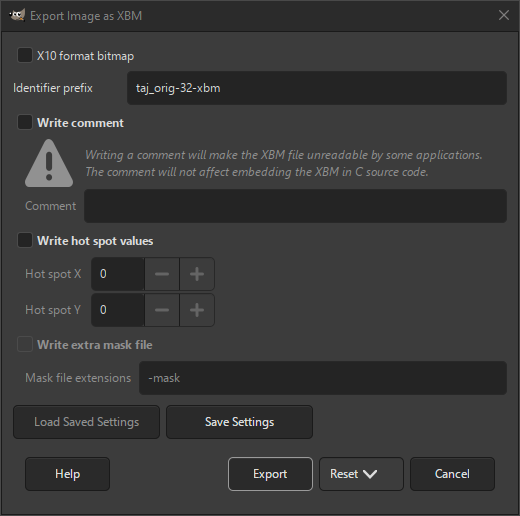
- X10 format bitmap
-
When checked, the image will use short integers instead of bytes to write the data.
- Identifier prefix
-
The prefix used to write the data. This is mainly useful if you intend to read this file from C source code.
- Write comment
-
When checked, a comment will be added to the output file. Not all image viewers are able to correctly show this image if a comment is present.
- Bildkommentar
-
When the above setting is enabled, you can enter your comment here.
- Write hot spot values
-
When checked, hot spot values will be added. These are used in icon files to set the location of the icon hot spot.
- Hot spot X, Hot spot Y
-
These values set the X and Y coordinate of the hot spot of the mouse cursor.
- Write extra mask file
-
When checked, a separate mask file will be created. The mask file contains the alpha channel for the XBM image. This setting is only enabled when your image has an alpha channel.
- Mask file extensions
-
This allows you to set the suffix that will be added to the name of your image. The name with suffix will be used to write the mask file.


