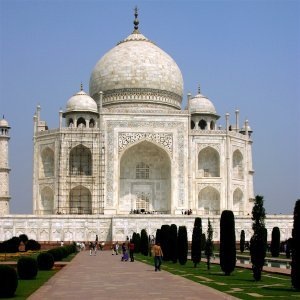
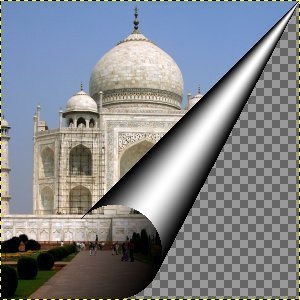
Αυτό το φίλτρο καμπυλώνει μια γωνία της τρέχουσας στρώσης ή επιλογής σε ένα είδος κώνου που δείχνει την υποκείμενη στρώση στην καθαρισμένη περιοχή. Δημιουργείται μια νέα «Στρώση καμπύλωσης». Εάν η στρώση δεν έχει κανάλι άλφα, προστίθεται ένα. Το τμήμα της αρχικής στρώσης που αντιστοιχεί στην καμπύλωση γίνεται διαφανές.
![[Σημείωση]](images/note.png)
|
Σημείωση |
|---|---|
|
Εάν η εικόνα βρίσκεται σε λειτουργία ευρετηρίου, αυτή η καταχώρηση μενού είναι απενεργοποιημένη. |

- Τοποθεσία
-
Αυτό σας επιτρέπει να επιλέξετε τη γωνία που θέλετε να κυρτώσετε. Η προεπιλεγμένη ρύθμιση είναι η κάτω δεξιά γωνία.
- Προσανατολισμός
-
Οι όροι Κάθετο και Οριζόντιο αναφέρονται στο περίγραμμα που θέλετε να ανασηκώσετε.
- Απόχρωση
-
Όταν είναι ενεργοποιημένη, προστίθεται μια σκιά μέσα στον κώνο.
- Χρώματα
-
Αυτό καθορίζει τον τρόπο σχεδίασης της εξωτερικής όψης του κώνου. Οι διαθέσιμες επιλογές είναι Χρώματα προσκηνίου / παρασκηνίου, Τρέχουσα διαβάθμιση και Τρέχουσα διαβάθμιση (αντίστροφη).
- Αδιαφάνεια
-
Αυτό ρυθμίζει την ορατότητα της αρχικής εικόνας κάτω από το κέρας.


