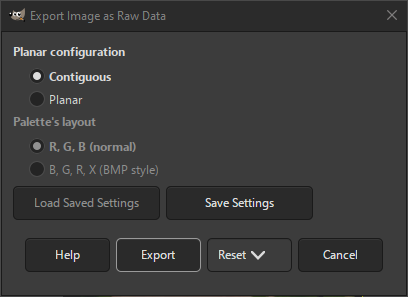
Raw image data means that the data of an image, i.e. pixels or palette indexes and a palette, is written directly to a file, without further information that exactly describes the organization of the image data.
Raw image data export should not be confused with the RAW formats that some digital cameras use for high quality images.
- Planar configuration
-
This setting determines how the color channels will be written to file.
- Contiguous
-
The image data will be written as contiguous pixels.
- Planar
-
The image data will be written as separate channels or planes, i.e. all the red values for each pixel are written first, then blue, and finally the green and possibly alpha values.
- Palette's layout
-
Only enabled for indexed images. It determines how the palette will be written.
- R, G, B (normal)
-
Each palette entry consists of a red, green and blue value, in that order.
- B, G, R, X (BMP style)
-
Each palette entry consists of a blue, green, red and undefined value, in that order. This is the format used in Windows BMP files.


