AVIF stands for AV1 Image File Format. It is an image file format specification for storing images or image sequences compressed with AV1 in the HEIF container format.
According to tests, AVIF showed better compression efficiency than JPEG as well as better detail preservation, fewer blocking artifacts and less color bleeding around hard edges in composites of natural images, text, and graphics. Most browsers support AVIF natively.
More information on Wikipedia.
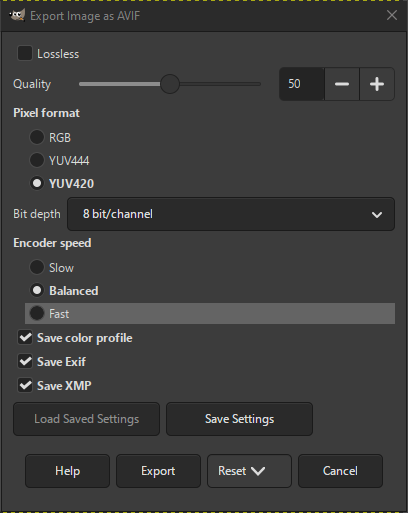
- Lossless
-
When checked, the image will be exported with lossless compression. This will create a higher quality image at the cost of a larger file size.
- Quality
-
If Lossless is not checked, this value determines the quality of the image compression. 100 provides the best quality image and lowest compression, while 0 provides the highest compression and worst quality image.
- Pixel format
-
Defines what pixel format the exported image should use for color sub-sampling. There are three options:
- YUV420
-
Suitable for photographs with lossy compression. This format is most compatible with other software that uses HEIF and AVIF.
- YUV444
-
When used with a high Quality setting, this format exports a visually lossless image.
- RGB
-
Useful when exporting images with true lossless quality.
RGB is not available when exporting as HEJ2.
- Bit depth
-
Determines if the pixel data should be stored using 8 bits, 10 bits, or 12 bits per color channel.
- Encoder speed
-
The tradeoff between speed and compression. Slow will provide a smaller filesize but takes longer to encode.
- Save color profile
-
If checked, the color profile is embedded in the exported image.
- Save Exif
-
If checked, the Exif metadata is embedded in the exported image.
- Save XMP
-
If checked, the XMP metadata is embedded in the exported image.


