Blur filters blur images, or parts of them, in various ways. If there is a selection, only the selected parts of an image will be blurred. There may, however, be some leakage of colors from the unblurred area into the blurred area.
Bu kategori aşağıdaki süzgeçleri açıklar:

Seçmenize yardımcı olmak için, yukarıda gösterilen görüntüye uygulandığında bazı süzgeçlerin ne yaptığını göstereceğiz. Bunlar yalnızca örnektir: süzgeçlerin çoğunda bulanıklaştırmanın büyüklüğünü ya da türünü değiştirmenizi sağlayan ayarlar vardır.

The most commonly used blur filter is the Gaussian Blur. Don't let the word “Gaussian” throw you off: this filter is the most basic kind of blur. It allows you to create a strong blur in a relatively short time.

The Pixelize filter produces the well-known “Abraham Lincoln” effect by turning the image into a set of large square pixels. (The Oilify filter, in the Artistic Filters group, has a similar effect, but with irregular blobs instead of perfectly square pixels.)
![[Not]](images/note.png)
|
Not |
|---|---|
|
You can find a nice explanation of the Abraham Lincoln effect at [BACH04]. You will see Salvador Dali's painting “Gala Contemplating the Mediterranean Sea” turning into Abraham Lincoln's portrait when looking at it from a distance. |

The Selective Gaussian Blur filter allows you to set a threshold so that only pixels that are similar to each other are blurred together. It is often useful as a tool for reducing graininess in photos without blurring sharp edges. (In the example, note that the graininess of the background has been reduced.) This filter is much slower than a Gaussian Blur, though, so only consider using it when you really need the selectivity.
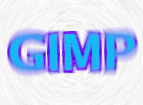
The Circular Motion Blur filter blurs in a radial direction around a center that you can set.
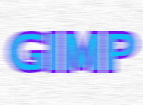
The Linear Motion Blur filter blurs in a linear direction that you can set.
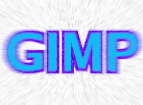
Yakınlaştırma Hareket Bulanıklığı süzgeci, ayarlayabileceğiniz merkez etrafında radyal yönde bulanıklık oluşturur, aynı zamanda merkezden uzaklaştıkça büyütür.
Finally, the Tileable Blur filter is really the same thing as a Gaussian Blur, except that it wraps around the edges of an image to help you reduce edge effects when you create a pattern by tiling multiple copies of the image side by side.


