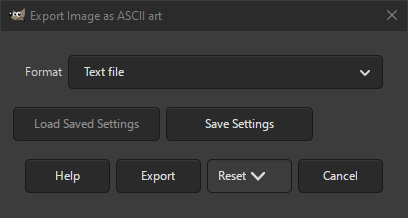
This is an old format that shows its age in some of the supported export types. It exports the image using the printable characters of the ASCII table, which consists mostly of alphanumeric and interpunction characters.
For each group of pixels it uses the character that most closely resembles the shape and brightness in the image. For more information see ASCII Art
- Format
-
The type of 「text」 file that should be created containing the ASCII Art.
- Text file
-
This exports it as a plain text file.
- Pure html
-
This exports it as an html file that can be opened in your browser.
- Netscapeized html
-
This exports it as an html file in Netscape (a predecessor of Mozilla Firefox) format. This can be opened in your browser. Compared to Pure html, this has a black background instead of white.
- HTML <IMG ALT=tag
-
This exports it as the 「alt」 (for alternate text) parameter of an 「img」 (image) html tag, that can be used in html.
- For more/less
-
This exports it in a format that can be used to show documentation on your screen from the command line, as supported by the Linux programs more and less.
- ANSI escape sequences
-
This exports it as ANSI escape sequences, that can be used by certain printers.
- HP laser jet - A4 small font
-
This exports it as a file that can be printed on an HP laser jet using A4 paper with a small font.
- HP laser jet - A4 big font
-
This exports it as a file that can be printed on an HP laser jet using A4 paper with a big font.
- For catting to an IRC channel
-
This exports it as a file that can be redirected to an IRC channel.
- For catting to an IRC channel II
-
This exports it as a file that can be redirected to an IRC channel. It uses a different format than the one mentioned above.
- For including in a man page
-
This exports it as a file that can be included in a so-called man page, which is a format used for showing documentation.


