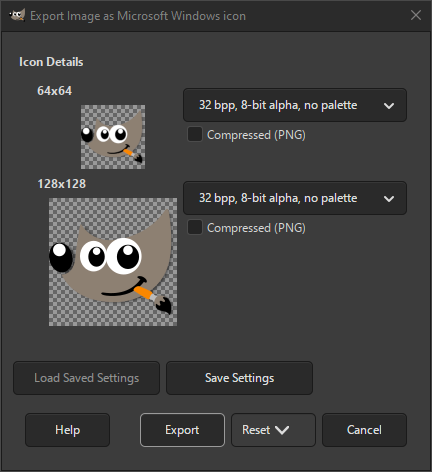
The Microsoft Windows Icon format is used on Windows for displaying icons. It supports multiple icon sizes and color depths.
A related format is the Microsoft Windows Cursor. The export dialog shows all the icons available. For each icon size, there are several settings that can be changed.
- Тип збереження
-
For each icon size you can select in what format it should be saved. The available choices are:
- 1 біт/точку, 1-біт альфа-каналом, 2-кольорова палітра
-
Indexed format with only two colors.
- 4 біта/точку, 1-біт альфа-канал, 16-кольорова палітра
-
Indexed format with only 16 colors.
- 8 біт/точку, 1-біт альфа-канал, 256-кольорова палітра
-
Indexed format with up to 256 colors.
- 24 біт/точку, 1-біт альфа-канал, без палітри
-
Для RGB без каналу прозорості.
- 32 біт/точку, 8-біт альфа-канал, без палітри
-
The most common format is RGB with alpha channel.
- Стиснений (PNG)
-
When checked, the icons are saved as compressed PNG images. Note that not all programs support reading this type of icon.


