EPS, or “Encapsulated PostScript”, is, as the name suggests, a format that encapsulates a PostScript document, that is usable as a graphics file format. For more information see Encapsulated PostScript.
It is essentially a PostScript program saved as a single file that can include an image preview of the final output.
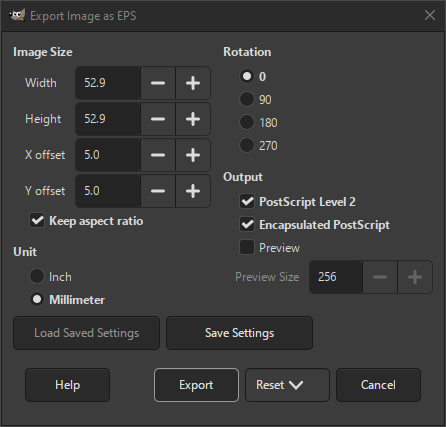
- Image Size
-
These settings determine the size and position of the image.
- Width, Height
-
Width and Height determine the dimensions at which you image will be exported.
Zero can be used here when you want the size of the original image to be used.
- X offset, Y offset
-
These determine the offset from the lower left corner.
- Keep aspect ratio
-
When checked, the resulting image will be scaled to fit into the given size, without changing the aspect ratio.
- Unit
-
- Inch
-
When selected, “Inch” is used for the values of the dimensions and offset.
- Millimeter
-
When selected, “Millimeter” is used for the values of the dimensions and offset.
- Rotation
-
This setting allows you to change the rotation of you image between 0 (default), 90, 180 or 270 degrees.
- Output
-
- PostScript Level 2
-
When checked, the output will use PostScript level 2 format, otherwise it will use level 1.
- Encapsulated PostScript
-
When checked, the output will use “Encapsulated PostScript”, otherwise “PostScript”.
The default for this setting is determined by which export format you chose.
- Preview
-
When checked, a preview image is included in your exported document.
- Preview Size
-
If you enabled the previous setting, then you can set the maximum size of the preview image here.


