This filter is used to remove small defects due to dust, or scratches, on a scanned image, and also moiré effects on images scanned from a magazine. You should select isolated defects before applying this filter, in order to avoid unwanted changes in other areas of your image. The filter replaces each pixel with the median value of the pixels within the specified radius.
![[Huomaa]](images/note.png)
|
Huomaa |
|---|---|
|
If the image is in indexed mode, this menu entry is disabled. |
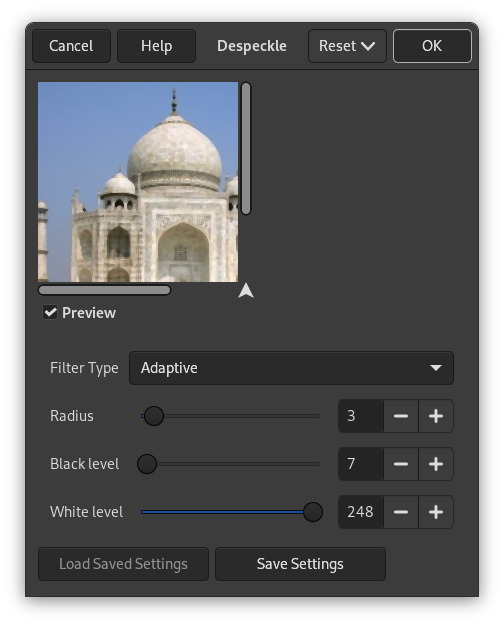
- Esikatselu
-
Jos tämä on valittu, niin parametriasetukset esitetään interaktiivisesti esikatselussa.
- Filter Type
-
- Keskiarvo
-
The median value of the pixels within the set Radius around the target pixel is used to replace the target pixel value.
- Mukautuva
-
Mukauttaa säteen kuvan tai valinnan sisältöön analysoimalla alueen histogrammia kohdepikselin ympärillä. Mukautuva säde on aina yhtä suuri tai pienempi kuin spesifioitu säde.
- Recursive-Median
-
Repeats the Median filter action to get a stronger effect.
- Recursive-Adaptive
-
Repeats the Adaptive filter action to get a stronger effect.
- Säde
-
Sets size of action window from 1 (3×3 pixels) to 20 (41×41). This window moves over the image, and the color in it is smoothed, so imperfections are removed.
- Mustan taso
-
Sisältää vain pikseleitä, jotka ovat kirkkaampia kuin asetettu arvo histogrammissa (-1-255).
- Valkoisen taso
-
Sisältää vain pikseleitä, jotka ovat tummempia kuin asetettu arvo histogrammissa (0-256).


