This filter is used to remove small defects due to dust, or scratches, on a scanned image, and also moiré effects on images scanned from a magazine. You should select isolated defects before applying this filter, in order to avoid unwanted changes in other areas of your image. The filter replaces each pixel with the median value of the pixels within the specified radius.
![[注記]](images/note.png)
|
注記 |
|---|---|
|
If the image is in indexed mode, this menu entry is disabled. |
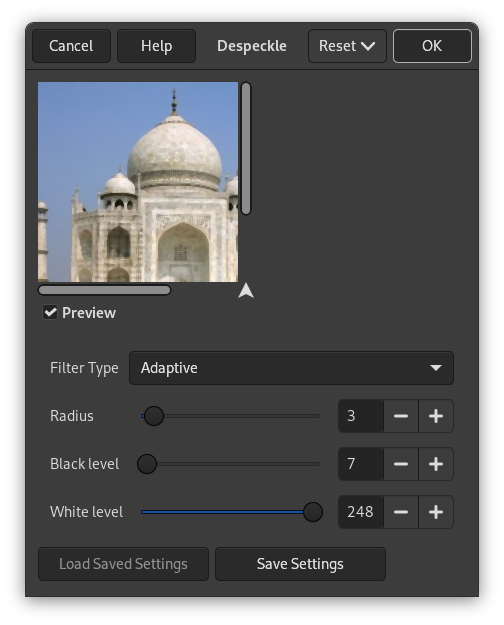
- プレビュー
-
プレビュー オプションを有効にしておれば画像に実際にフィルターをかける前からダイアログ上で調節したとおりに即座に効果のようすが見て判るようになっています。
- Filter Type
-
- 中央値
-
The median value of the pixels within the set Radius around the target pixel is used to replace the target pixel value.
- 適応的
-
画像もしくは選択範囲の内容に最適な半径の値を、 対象画素の周辺のヒストグラムの解析にしたがい設定します。 適応的半径は、 常に指定された半径以下の大きさになります。
- Recursive-Median
-
Repeats the Median filter action to get a stronger effect.
- Recursive-Adaptive
-
Repeats the Adaptive filter action to get a stronger effect.
- 半径
-
Sets size of action window from 1 (3×3 pixels) to 20 (41×41). This window moves over the image, and the color in it is smoothed, so imperfections are removed.
- 黒レベル
-
ヒストグラムでここに指定した値よりも明るい画素だけを含めます。 -1 から 255 の範囲で指定します。
- 白レベル
-
ヒストグラムでここに指定した値よりも暗い画素だけを含めます。 -1 から 255 の範囲で指定します。


