«PostScript» è un linguaggio di descrizione delle pagine, comunemente utilizzato nell'editoria elettronica e nel desktop publishing. Per ulteriori informazioni, consultare PostScript.
Un formato strettamente correlato è il PostScript incapsulato.
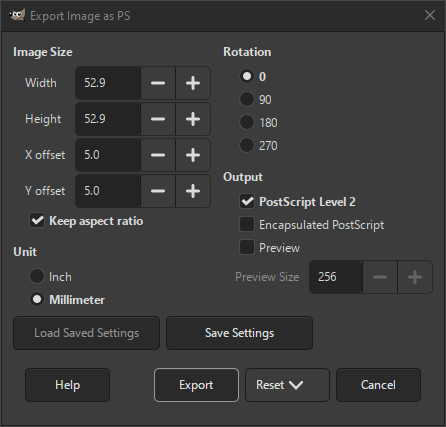
- Dimensione immagine
-
Queste impostazioni determinano la dimensione e la posizione dell'immagine.
- Larghezza, Altezza
-
Larghezza e Altezza determinano le dimensioni in cui verrà esportata l'immagine.
Qui è possibile utilizzare zero quando si desidera utilizzare le dimensioni dell'immagine originale.
- Scostamento X, Scostamento Y
-
Questi determinano lo scostamento dall'angolo inferiore sinistro.
- Mantieni rapporto dimensioni
-
Se selezionata, l'immagine risultante verrà ridimensionata per adattarsi alle dimensioni specificate, senza modificarne le proporzioni.
- Unità
-
- Pollici
-
Se selezionata, vengono usati i «pollici» per i valori delle dimensioni e dello scostamento.
- Millimetri
-
Se selezionata, vengono usati i «millimetri» per i valori delle dimensioni e dello scostamento.
- Rotazione
-
Questa impostazione consente di modificare la rotazione dell'immagine tra 0 (predefinito), 90, 180 o 270 gradi.
- Risultato
-
- Postscript Livello 2
-
Se selezionata, il risultato userà il formato PostScript livello 2, altrimenti utilizzerà il livello 1.
- PostScript incapsulato
-
Se selezionata, il risultato userà «PostScript incapsulato», altrimenti «PostScript» normale.
L'impostazione predefinita per questa impostazione è determinata dal formato di esportazione scelto.
- Anteprima
-
Se selezionata, un'immagine di anteprima verrà inclusa nel documento esportato.
- Dimensione anteprima
-
Se abilitata l'impostazione precedente, si può impostare qui la dimensione massima dell'immagine di anteprima.


