Photoshop è un noto editor di immagini. Questa finestra di dialogo di esportazione consente di esportare nel formato nativo di Photoshop, PSD.
Si può esportare l'immagine in questo formato scegliendo l'estensione «.psd» oppure scegliendo esplicitamente «Immagine Photoshop» come tipo di file nella finestra di dialogo di esportazione.
Alcune considerazioni sull'esportazione in formato PSD. Non tutte le modalità di fusione possono essere convertite in un equivalente esatto tra GIMP e Photoshop. Per molte modalità di fusione, le modalità di livello tradizionali sono più vicine agli equivalenti di Photoshop. Tuttavia, le modalità di livello tradizionali non supportano l'impostazione della modalità composita. Photoshop utilizza spesso l'equivalente della nostra modalità composita Ritaglia su sfondo. Lì si chiama «Blend Clipped Layers as Group». Se si desidera supportare questa modalità, non si dovrebbero utilizzare le modalità di livello tradizionali.
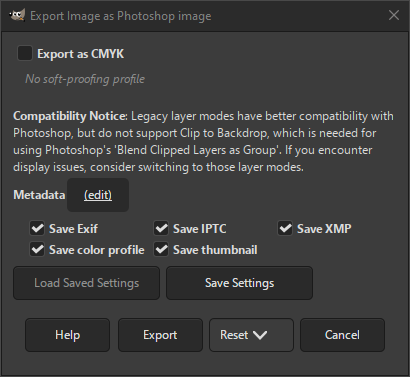
- Esporta come CMYK
-
Se si ha assegnato un profilo CMYK all'immagine come profilo di soft-proofing (provino video), si può selezionare questa impostazione per esportare l'immagine utilizzando quel profilo CMYK. A volte, questa impostazione è necessaria quando si desidera far stampare l'immagine da un professionista. La tipografia indicherà se è necessario.
Se questa impostazione è disabilitata, non si ha ancora impostato un profilo di soft proofing (provino video) per questa immagine. Consultare la sezione relativa all'assegnazione di un profilo di soft proofing (provino video).
Il nome del profilo CMYK assegnato a questa immagine verrà visualizzato sotto questa impostazione.
- Metadati (modifica)
-
Si può fare clic sul collegamento «(modifica)» per aprire l'editor dei metadati per cambiare o aggiungere qualunque metadato che si desideri venga incluso nell'immagine. Nota: sarà inoltre necessario abilitare le relative opzioni di salvataggio dei metadati elencate di seguito.
Le impostazioni dei metadati nella finestra di dialogo di esportazione sostituiscono i valori predefiniti impostati nelle Preferenze di esportazione dei metadati.
- Salva dati Exif
-
Se quest'opzione è abilitata i metadati EXIF verranno salvati nell'immagine esportata.
- Salva dati IPTC
-
Se quest'opzione è abilitata i metadati IPTC verranno salvati nell'immagine esportata.
- Salva dati XMP
-
Se quest'opzione è abilitata i metadati XMP verranno salvati nell'immagine esportata.
- Salva profilo colore
-
Se questa opzione è abilitata il profilo colore verrà salvato nell'immagine esportata.
- Salva miniatura
-
Se questa opzione è abilitata, una miniatura verrà salvata nell'immagine esportata come parte dei metadati EXIF. Ciò comporterà anche il salvataggio di alcuni marcatori EXIF, anche se si ha disabilitato il salvataggio dei metadati EXIF.


