JPEG XL is an image format that supports both lossy and lossless compression. The lossy compression is similar to that of JPEG, but significantly improved. Besides that there is a «modular» mode, that can be used for lossless compression similar to PNG, and also as an alternate lossy compression mode.
You can export your image in this format when you choose the «.jxl» extension, or explicitly choose «JPEG XL» as file type in the export dialog.
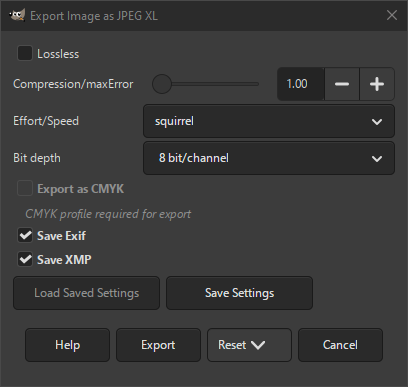
- Без потерь
-
Если флажок установлен, экспорт изображения будет выполнен со сжатием без потерь. Это позволит создать изображение более высокого качества за счёт большего размера файла.
When unchecked, the image will use a lossy compression technique that can reduce the file size more.
- Compression/maxError
-
When Lossless is unchecked, this setting influences the amount of compression. Lower values give higher quality. At the minimum value of 1.0 it is visually almost the same as lossless.
- Effort/Speed
-
This setting determines how much effort the encoder will put into reaching the desired quality, influenced by the Compression/maxError parameter.
A higher effort may create more accurate results, but sometimes higher file size in lossy compression mode. A higher effort also consumes more memory too. Usually there is no reason to change the default value (squirrel).
- Глубина цвета
-
Determines if the pixel data should be stored using 8 bits or 16 bits per color channel.
- Экспортировать как CMYK
-
If you have a CMYK profile assigned to your image as soft-proofing profile, this setting can be checked to have your image exported using that CMYK profile. This is sometimes required when you have your image professionally printed. Your printing company will tell you if this is needed.
If this setting is disabled, you don't have a soft-proofing profile set for this image yet. See assigning a Soft-Proof Profile.
The name of the CMYK profile that is assigned to this image will be shown below this setting.
- Сохранить Exif
-
Если флажок установлен, метаданные Exif будут встроены в экспортируемое изображение.
- Сохранить XMP
-
Если флажок установлен, метаданные XMP будут встроены в экспортируемое изображение.


