JPEG XL è un formato immagine che supporta sia la compressione con perdita di dati che quella senza perdite. La compressione con perdita di dati è simile a quella del JPEG, ma notevolmente migliorata. Inoltre, esiste una modalità «modulare», che può essere utilizzata per la compressione senza perdite, simile a PNG, e anche come modalità di compressione con perdita di dati alternativa.
Si può esportare l'immagine in questo formato scegliendo l'estensione «.jxl» oppure scegliendo esplicitamente «JPEG XL» come tipo di file nella finestra di dialogo di esportazione.
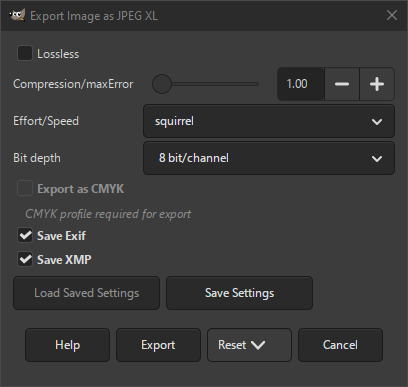
- Senza perdite
-
Se selezionata, l'immagine verrà esportata con compressione lossless. Questo creerà un'immagine di qualità superiore, ma con dimensioni maggiori.
Se deselezionata, l'immagine utilizzerà una tecnica di compressione con perdita di dati che può ridurre ulteriormente le dimensioni del file.
- Compressione/maxError
-
Quando Senza perdite non è selezionata, questa impostazione influenza la quantità di compressione. Valori più bassi forniscono una qualità maggiore. Al valore minimo di 1,0, è visivamente quasi equivalente a lossless.
- Sforzo/Velocità
-
Questa impostazione determina quanto sforzo verrà impiegato nella codifica per raggiungere la qualità desiderata, ed è influenzata dal parametro Compressione/maxError.
Un maggiore sforzo può produrre risultati più accurati, ma a volte le dimensioni dei file sono maggiori in modalità di compressione con perdita di dati. Un maggiore sforzo consuma anche più memoria. Di solito non c'è motivo di modificare il valore predefinito (scoiattolo).
- Profondità bit
-
Determina se i dati pixel devono essere memorizzati utilizzando 8 bit, o 16 bit per canale colore.
- Esporta come CMYK
-
Se si ha assegnato un profilo CMYK all'immagine come profilo di soft-proofing (provino video), si può selezionare questa impostazione per esportare l'immagine utilizzando quel profilo CMYK. A volte, questa impostazione è necessaria quando si desidera far stampare l'immagine da un professionista. La tipografia indicherà se è necessario.
Se questa impostazione è disabilitata, non si ha ancora impostato un profilo di soft proofing (provino video) per questa immagine. Consultare la sezione relativa all'assegnazione di un profilo di soft proofing (provino video).
Il nome del profilo CMYK assegnato a questa immagine verrà visualizzato sotto questa impostazione.
- Salva Exif
-
Se selezionata, i metadati Exif vengono incorporati nell'immagine esportata.
- Salva XMP
-
Se selezionata, i metadati XMP vengono incorporati nell'immagine esportata.


