This plug-in lets you play an animation from a multi-layers image. GIMP supports several formats that allow you to export an animation, e.g. webp, gif and mng. In addition to that, GIMP supports loading (but at this time not exporting) apng images. Regular multi-layer formats like GIMP's own XCF as well as PSD, TIFF and PSP also allow you to use multiple layers that can be interpreted by this animation player as an animation.
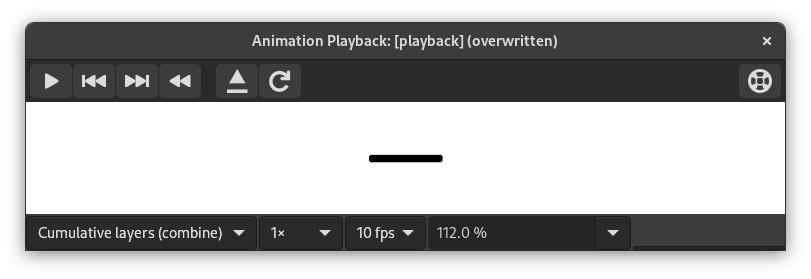
Овај прозор садржи:
- Преглед
-
The center of the Playback dialog is taken up by a preview of the animation that automatically fits to the frame size. The number of the displayed frame as well as the total number of frames is shown below the preview next to the player controls.
- Drop-down lists at the top
-
The following drop-down lists and controls are available above the preview:
- Комбинуј/Замени слојеве
-
Ово може бити за приказивање свих кадрова један преко другог, или за приказивање само последњег кадра.
- Број кадрова по секунди
-
Ово вам омогућава да подесите број кадрова у секунди који се користе при пуштању анимације.
- Брзина за пуштање
-
Ово вам омогућава да подесите брзину анимације.
- Увећање
-
Ово вам омогућава да подесите ниво увећања анимације.
- Player Controls at the top right
-
-
 Reload the image
-
This loads the animation again, useful if changes have been made.
-
 Detach the animation from the dialog window
-
Ово одваја анимацију од прозора.
-
 Help
Help
-
Show this documentation for Animation Playback.
-
- Player Controls at the bottom
-
The following controls are available below the preview:
-
 Покрени пуштање/Заустави пуштање
-
Ово покреће или зауставља анимацију.
-
 Корак назад на претходни кадар
-
Ово пушта анимацију уназад, корак по корак.
-
 Корак на следећи кадар
-
Ово пушта анимацију корак по корак.
-
 Премотај анимацију
-
Ово премотава анимацију на почетак.
-


