Denna insticksmodul låter dig spela upp en animation från en bild med flera lager. GIMP stöder flera format som låter dig exportera en animation, t.ex. webp, gif och mng. Utöver detta stöder GIMP inläsning (men för tillfället inte export) av apng-bilder. Vanliga flerlagerformat som GIMPs egna XCF såväl som PSD, TIFF och PSP låter dig också använda flera lager som kan tolkas av denna animeringsuppspelare som en animation.
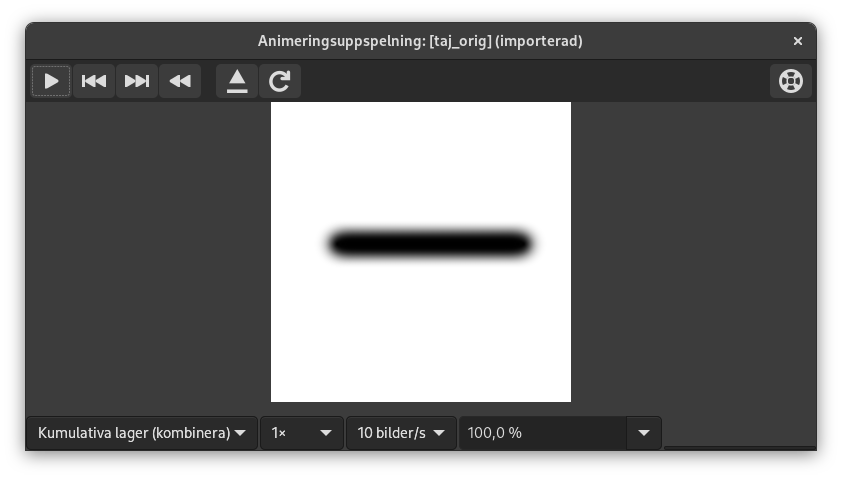
Denna dialogruta innehåller:
- Förhandsvisning
-
Uppspelningsdialogens centrum tas upp av en förhandsvisning av animationen som anpassar sig automatiskt till bildrutans storlek. Numret för den visade bildrutan såväl som det totala antalet bildrutor visas under förhandsvisningen intill uppspelningskontrollerna.
- Rullgardinslistor högst upp
-
Följande rullgardinslistor och kontroller finns tillgängliga ovanför förhandsvisningen:
- Kombinera/Ersätt lager
-
Detta kan vara för att visa alla bildrutor så här långt ovanpå varandra, eller för att endast visa den senaste bildrutan.
- Standardbildfrekvens
-
Detta låter dig ställa in antalet bildrutor per sekund som används vid uppspelning.
- Uppspelningshastighet
-
Detta låter dig ställa in animationens hastighet.
- Zooma
-
Detta låter dig ställa in animationens zoomnivå.
- Uppspelningskontroller längst upp till höger
-
-
 Läs in bilden på nytt
-
Detta läser in animationen igen, användbart om ändringar har gjorts.
-
 Koppla loss animationen från dialogfönstret
-
Detta kopplar loss animationen från fönstret.
-
 Hjälp
Hjälp
-
Visa denna dokumentation för Animeringsuppspelning.
-
- Uppspelningskontroller längst ner
-
Följande kontroller finns tillgängliga under förhandsvisningen:
-
 Starta uppspelning/Stoppa uppspelning
-
Detta spelar upp eller stoppar animationen.
-
 Stega tillbaka till föregående bildruta
-
Detta spelar upp animationen baklänges steg för steg.
-
 Stega till nästa bildruta
-
Detta spelar upp animationen steg för steg.
-
 Spola tillbaka animationen
-
Detta spolar tillbaka animationen till början.
-


