This plug-in lets you play an animation from a multi-layers image. GIMP supports several formats that allow you to export an animation, e.g. webp, gif and mng. In addition to that, GIMP supports loading (but at this time not exporting) apng images. Regular multi-layer formats like GIMP's own XCF as well as PSD, TIFF and PSP also allow you to use multiple layers that can be interpreted by this animation player as an animation.
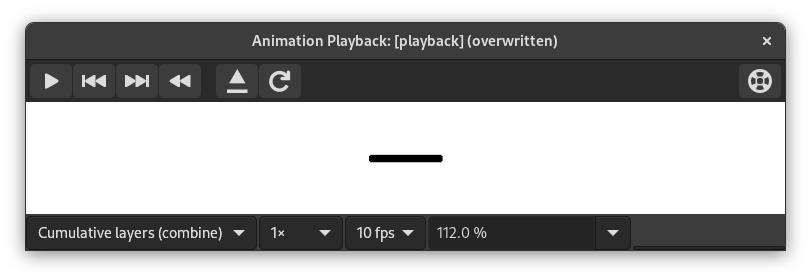
Bu iletişim kutusunda:
- Ön izleme
-
The center of the Playback dialog is taken up by a preview of the animation that automatically fits to the frame size. The number of the displayed frame as well as the total number of frames is shown below the preview next to the player controls.
- Drop-down lists at the top
-
The following drop-down lists and controls are available above the preview:
- Katmanları Birleştir/Değiştir
-
Bu, tüm kareleri üst üste göstermek için , ya da yalnızca en son kareyi göstermek için olabilir.
- Öntanımlı kare oranı
-
Bu, canlandırma oynatırken kullanılan saniye başına kare sayısını ayarlamanızı sağlar.
- Oynatma hızı
-
Bu, canlandırmanın hızını ayarlamanızı sağlar.
- Yakınlaştır
-
Bu, canlandırmanın yakınlaştırma düzeyini ayarlamanızı sağlar.
- Player Controls at the top right
-
-
 Reload the image
-
This loads the animation again, useful if changes have been made.
-
 Detach the animation from the dialog window
-
Bu, canlandırmayı pencereden ayırır.
-
 Help
Help
-
Show this documentation for Animation Playback.
-
- Player Controls at the bottom
-
The following controls are available below the preview:
-
 Oynatmaya başla/Oynatmayı durdur
-
Bu, canlandırmayı oynatır ya da durdurur.
-
 Önceki kareye git
-
Bu, canlandırmayı adım adım geriye doğru oynatır.
-
 Sonraki kareye git
-
Bu, canlandırmayı adım adım oynatır.
-
 Canlandırmayı geri sar
-
Bu, canlandırmayı başa sarar.
-


