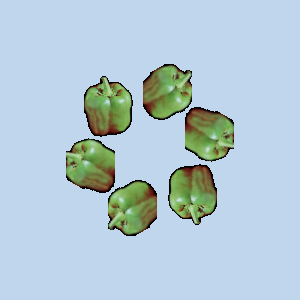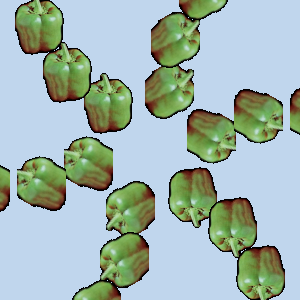
Η συμμετρική βαφή υποστηρίζεται από εργαλεία με βάση το πινέλο (μολύβι, πινέλο, σβήστρα, αερογράφος, πινέλο MyPaint(Βαφήμου), κλωνοποίηση, μουντζούρα, ξάνοιγμα) καθώς και το εργαλείο μελανιού. Υπάρχουν πολλά είδη συμμετρίας, όλα διαμορφώσιμα.
Μπορείτε να προσπελάσετε αυτόν τον διάλογο από το κύριο μενού μέσα από: → →
Ο διάλογος «Συμμετρική βαφή» είναι προσαρτήσιμος. Διαβάστε το Τμήμα 2.3, «Διάλογοι και προσάρτηση» για να μάθετε περισσότερα για την έννοια της προσάρτησης.
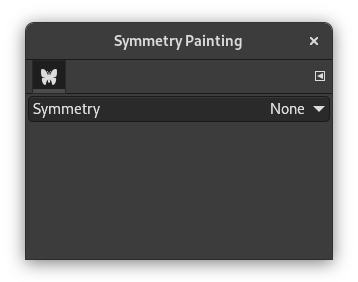
Αυτός ο διάλογος είναι πολύ απλός. Έχετε μόνο ένα στοιχείο συμμετρίας με έναν πτυσσόμενο κατάλογο που προσφέρει τέσσερις επιλογές. Μόλις σημειώσετε έναν τύπο συμμετρίας, εμφανίζονται οι άξονες συμμετρίας ως εστιγμένες πράσινες γραμμές στο παράθυρο της εικόνας και μπορείτε να αρχίσετε να βάφετε με το πινέλο που διαλέξατε.
Επιλογές
- Συμμετρία
-
Αυτή η ρύθμιση καθορίζει τον τύπο της συμμετρικής βαφής.
- Κανένα
-
Αυτή είναι η προεπιλογή. Απενεργοποιεί τη βαφή συμμετρίας.
- Καθρέπτης
-
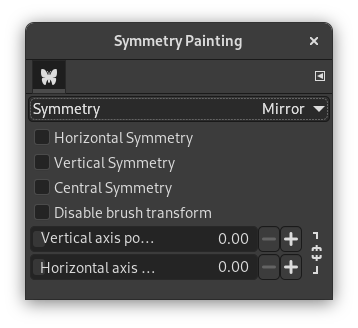
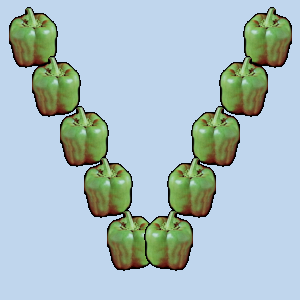
Αυτός ο τύπος συμμετρίας θα αντανακλά όλες τις πινελιές σαν σε καθρέφτη. Υπάρχουν διάφοροι τύποι καθρέφτη. Μπορείτε να επιλέξετε περισσότερους από έναν τύπους.
Επιλογές καθρέπτη
- Οριζόντια συμμετρία
-
Οι πινελιές θα αντικατοπτρίζονται σε οριζόντιο άξονα.
- Κάθετη συμμετρία
-
Οι πινελιές θα αντικατοπτρίζονται σε έναν κάθετο άξονα.
- Κεντρική συμμετρία
-
Οι πινελιές θα αναστρέφονται μέσω ενός κεντρικού σημείου.
- Απενεργοποίηση μετασχηματισμού πινέλου
-
Όταν μετασχηματίζετε το σχέδιο, το ίδιο το πινέλο θα μετασχηματιστεί επίσης. Για παράδειγμα, σε έναν μετασχηματισμό κατοπτρισμού, όχι μόνο το σχέδιό σας στη δεξιά πλευρά του καμβά θα αντικατοπτρίζεται στα αριστερά, αλλά το ίδιο το πινέλο «αναστρέφεται» και στα αριστερά.
Εάν θέλετε οι σχεδιασμένες γραμμές να αντικατοπτρίζονται (ή να μεταμορφώνονται με άλλο τρόπο), αλλά όχι το ίδιο το περίγραμμα του πινέλου, ενεργοποιήστε αυτήν τη ρύθμιση. Προφανώς, θα παρατηρήσετε το αποτέλεσμα αυτής της ρύθμισης μόνο όταν χρησιμοποιείτε ένα πινέλο που δεν είναι συμμετρικό.
- Κάθετη θέση άξονα, Οριζόντια θέση άξονα
-
Η προεπιλεγμένη θέση για τους άξονες συμμετρίας είναι το κέντρο της εικόνας. Αυτά τα ρυθμιστικά σάς επιτρέπουν να αλλάξετε τη θέση που χρησιμοποιείται για την αντικατοπτρισμό των πινελιών σας.
Πατώντας το εικονίδιο κλειδαριάς δίπλα στα ρυθμιστικά, μπορείτε να επιλέξετε εάν θέλετε να διατηρήσετε και τα δύο ρυθμιστικά συγχρονισμένα ή όχι.
- Παράθεση
-
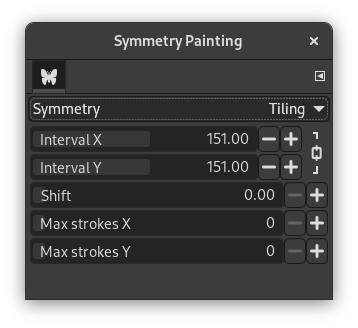
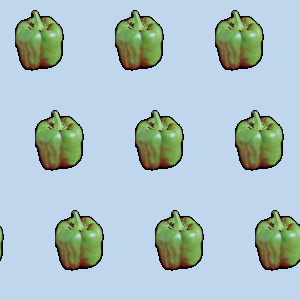
«Παράθεση» είναι μια μεταφορική συμμετρία, που μπορεί να είναι πεπερασμένη (με ένα μέγιστο πινελιών) ή άπειρη. Στη δεύτερη περίπτωση, είναι το τέλειο εργαλείο για τη δημιουργία μοτίβων ή παραθέσεων χωρίς ραφή.
Αυτή η λειτουργία καλύπτει την εικόνα με πινελιές σε κανονικές αποστάσεις στον άξονα X και Y.
Επιλογές παράθεσης
- Διάστημα Χ, Διάστημα Υ
-
Αυτά είναι τα διαστήματα στον άξονα X και Y, σε εικονοστοιχεία, μεταξύ των κέντρων κάθε πινελιάς.
- Μετατόπιση
-
Αυτό καθορίζει το μέγεθος της μετατόπισης μεταξύ των γραμμών στον άξονα Χ, σε εικονοστοιχεία.
- Μέγιστες πινελιές στον Χ, Μέγιστες πινελιές στον Υ
-
Αυτός είναι ο μέγιστος αριθμός πινελιών στον άξονα X και Y που θα βαφτούν στην εικόνα. Η προεπιλογή είναι 0, που σημαίνει ότι δεν υπάρχει όριο.
Πατώντας το εικονίδιο κλειδαριάς δίπλα στα ρυθμιστικά, μπορείτε να επιλέξετε εάν θέλετε να διατηρήσετε και τα δύο ρυθμιστικά συγχρονισμένα ή όχι.
- Μάνταλα
-
Τα περιγράμματα σχεδιάζονται γύρω από το κέντρο, όπως καθορίζεται από τις παρακάτω επιλογές.
Επιλογές Μαντάλα
- Τετμημένη κέντρου, Τεταγμένη κέντρου
-
Αυτές οι συντεταγμένες καθορίζουν το κέντρο γύρω από το οποίο θα βαφτούν οι πινελιές της μαντάλας.
Πατώντας το εικονίδιο κλειδαριάς δίπλα στα ρυθμιστικά, μπορείτε να επιλέξετε εάν θέλετε να διατηρήσετε και τα δύο ρυθμιστικά συγχρονισμένα ή όχι.
- Αριθμός σημείων
-
Αυτό καθορίζει τον αριθμό των πινελιών που θα εκτελούνται κάθε φορά που χρησιμοποιείτε ένα πινέλο.
- Απενεργοποίηση μετασχηματισμού πινέλου
-
Δείτε την ίδια ρύθμιση για τη συμμετρία Κατοπτρισμού.
- Καλειδοσκόπιο
-
Όταν είναι ενεργοποιημένο, αντικατοπτρίζει διαδοχικές κινήσεις.