Il formato JPEG 2000 è stato sviluppato per sostituire JPEG. Supporta sia la compressione con perdita di dati che senza perdite e le immagini ad alta gamma dinamica. GIMP dispone anche di un esportatore codestream JPEG 2000 e di un esportatore JPEG 2000 per memorizzare un'immagine JPEG 2000 in un contenitore HEIF.
Rispetto al JPEG, il formato JPEG 2000 offre generalmente una compressione migliorata, dell'ordine del 20%, a seconda delle caratteristiche dell'immagine. Le immagini ad alta risoluzione tendono a trarne i maggiori benefici.
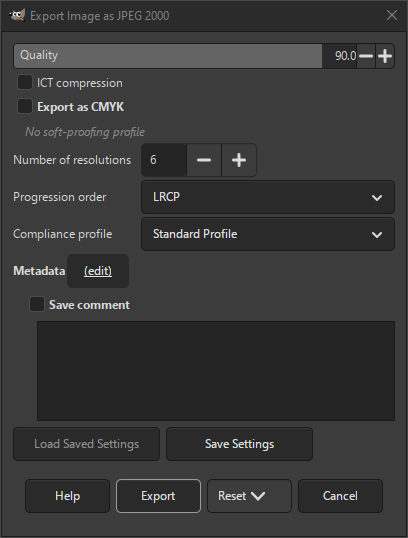
- Compressione ICT
-
Se selezionata, verrà utilizzata la compressione ICT (Irreversible Color Transform) al posto di RCT (Reversible Color Transform). La ICT può causare errori di arrotondamento, il che significa che è una compressione con perdita di dati, a differenza della RCT.
- Esporta come CMYK
-
Se si ha assegnato un profilo CMYK all'immagine come profilo di soft-proofing (provino video), si può selezionare questa impostazione per esportare l'immagine utilizzando quel profilo CMYK. A volte, questa impostazione è necessaria quando si desidera far stampare l'immagine da un professionista. La tipografia indicherà se è necessario.
Se questa impostazione è disabilitata, non si ha ancora impostato un profilo di soft proofing (provino video) per questa immagine. Consultare la sezione relativa all'assegnazione di un profilo di soft proofing (provino video).
Il nome del profilo CMYK assegnato a questa immagine verrà visualizzato sotto questa impostazione.
- Numero di risoluzioni
-
Imposta questo valore sul numero di risoluzioni che si desidera vengano memorizzate nell'immagine. In questo modo, le immagini verranno ridotte per un caricamento più rapido.
- Ordine di progressione
-
Definisce come i dati dell'immagine sono organizzati nel flusso di codice JPEG 2000, consentendo di dare priorità alla visualizzazione progressiva in base a qualità, risoluzione o componente. Le lettere stanno appunto per Livello, Risoluzione, Componente, Posizione.
- LRCP
-
Impostazione predefinita. Mostra prima i livelli di qualità, poi la risoluzione, poi i componenti, quindi le posizioni spaziali (ideale per un aumento graduale della qualità).
- RLCP
-
Mostra tutti i dati per la risoluzione più bassa, quindi aggiunge livelli e passa al livello di risoluzione successivo.
- PCRL
-
Mostra prima le tessere a piena risoluzione, poi riempie i livelli, ottimo per un'anteprima rapida.
- RPCL
-
Si concentra innanzitutto sui dettagli spaziali all'interno di una tessera.
- CPRL
-
Si concentra sui dati completi di una componente prima di passare alla successiva.
- Profilo di conformità
-
Seleziona il profilo di conformità di cui si ha bisogno per l'immagine.
- Profilo standard
-
L'impostazione predefinita è conforme alla funzionalità standard di base per le immagini JPEG 2000.
- Cinema2K (24 FPS)
-
Genera un flusso di codice conforme alle specifiche del cinema digitale per contenuti con risoluzione 2K a 24 FPS.
- Cinema2K (48 FPS)
-
Genera un flusso di codice conforme alle specifiche del cinema digitale per contenuti con risoluzione 2K a 48 FPS.
- Cinema4K (24 FPS)
-
Genera un flusso di codice conforme alle specifiche del cinema digitale per contenuti con risoluzione 4K a 24 FPS.
- Metadati (modifica)
-
Si può fare clic sul collegamento «(modifica)» per aprire l'editor dei metadati per cambiare o aggiungere qualunque metadato che si desideri venga incluso nell'immagine. Nota: sarà inoltre necessario abilitare le relative opzioni di salvataggio dei metadati elencate di seguito.
Le impostazioni dei metadati nella finestra di dialogo di esportazione sostituiscono i valori predefiniti impostati nelle Preferenze di esportazione dei metadati.
- Salva commento
-
Si può leggere questo commento nelle Proprietà dell'immagine.


