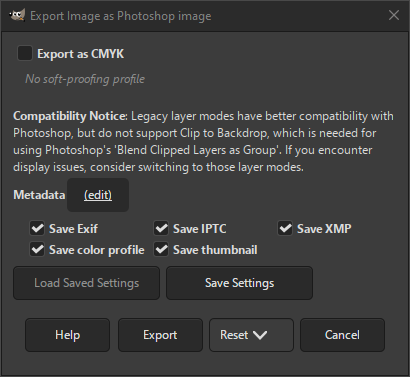
Photoshop is a well known image editor. This export dialog allows you to export in Photoshop's native PSD format.
You can export your image in this format when you choose the «.psd» extension, or explicitly choose «Photoshop image» as file type in the export dialog.
Some considerations when exporting to a PSD. Not all blending modes can be converted to an exact equivalent between GIMP and Photoshop. For many blending modes, the legacy layer modes are closer to Photoshop's equivalents. However, legacy layer modes do not support setting the composite mode. Photoshop often uses the equivalent of our Clip to Backdrop composite mode. There it is called «Blend Clipped Layers as Group». If you want to support that, you should not use legacy layer modes.
- Экспортировать как CMYK
-
If you have a CMYK profile assigned to your image as soft-proofing profile, this setting can be checked to have your image exported using that CMYK profile. This is sometimes required when you have your image professionally printed. Your printing company will tell you if this is needed.
If this setting is disabled, you don't have a soft-proofing profile set for this image yet. See assigning a Soft-Proof Profile.
The name of the CMYK profile that is assigned to this image will be shown below this setting.
- Метаданные (изменить)
-
You can click the «(edit)» link to open the metadata editor to change or add any metadata that you want to be included in the image. Note: you will also still need to enable the relevant metadata saving options listed below.
The metadata settings in the export dialog override the default values set in your Metadata Export Preferences.
- Сохранить данные Exif
-
When this option is enabled, EXIF metadata will be saved in the exported image.
- Сохранить данные IPTC
-
When this option is enabled, IPTC metadata will be saved in the exported image.
- Сохранить данные XMP
-
When this option is enabled, XMP metadata will be saved in the exported image.
- Сохранить цветовой профиль
-
When this option is enabled, the color profile will be saved in the exported image.
- Сохранить миниатюру
-
When this option is enabled a thumbnail will be saved in the exported image as part of the EXIF metadata. This will also cause certain EXIF tags to be saved, even if you have disabled saving EXIF metadata.


