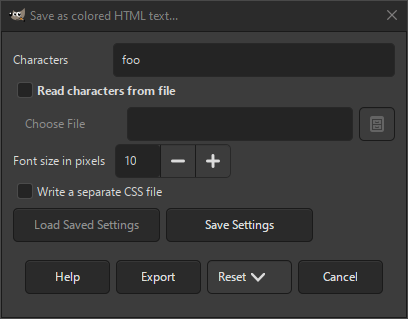
The colored HTML text export dialog allows you to export your image as an html file where each pixel in the image is represented by text using the pixel color as background color. A similar exporter is HTML Table.
You can export your image in this format when you choose the «.html» or «.xhtml» extension, or explicitly choose «Colored HTML text» as file type in the export dialog.
![[Застереження]](images/warning.png)
|
Застереження |
|---|---|
|
This generates very large html tables, even for smaller size images. This can slow down or even crash your browser. |
- Символи
-
The characters to use for each pixel.
- Читати символи з файла
-
If checked, the characters to use for each pixel will be read from a file.
- Вибрати файл
-
The name of the file with the characters to use can be specified here. The button can be used to use a file browser to select the file.
- Розмір шрифту у пікселях
-
You can specify the size of the text in the html file here.
- Записати окремий файл CSS
-
If checked, a separate css file will be written containing the styles used to display the html. If unchecked, the css will be included in the html file.


