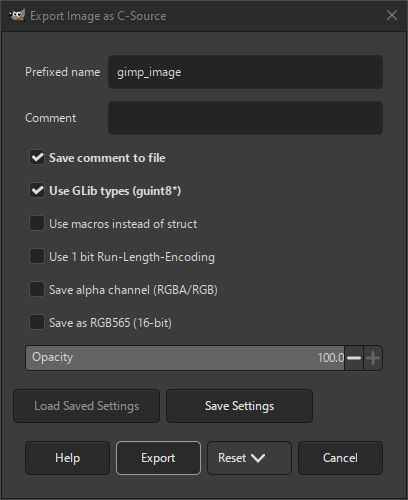
The C-source export dialog allows you to export your image as a C source file that can be included in a program written in C.
- Назва з префіксом
-
The name of the variable that will hold the image data.
- Коментар
-
A comment that will be added to the image data.
- Зберегти коментар у файлі
-
The Comment will only be exported to the C file when this setting is checked.
- Використовувати типи GLib (guint8*)
-
When checked GLib datatypes like «guint8» will be used. When unchecked, plain C datatypes will be used instead.
- Use macros instead of a struct
-
When checked, macros will be used to define the image data. When unchecked, a struct will be used instead.
- Використовувати 1-бітове RLE
-
When checked, the image data will be encoded using Run-Length-Encoding compression. A function macro called
GIMP_IMAGE_RUN_LENGTH_DECODE
will be added to the source file that can be used to decode the image data.
- Зберегти альфа-канал (RGBA/RGB)
-
When checked, the image data will include the alpha channel.
- Зберегти як RGB565 (16 біт)
-
When checked, the image data will be saved in 16-bit RGB565 format, using only two bytes instead of three to store the image data.
- Непрозорість
-
This slider allows you to set the opacity of the image data.


