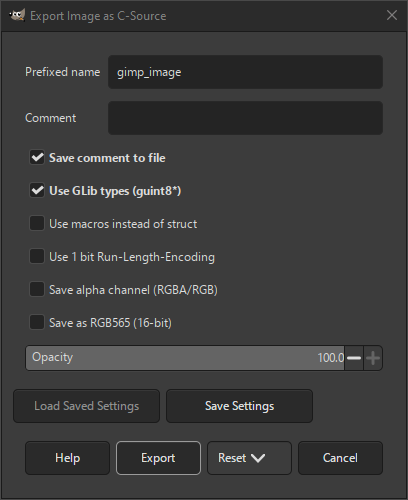
La finestra di dialogo di esportazione sorgente C consente di esportare l'immagine come file sorgente C che può essere incluso in un programma scritto in C.
- Nome prefissato
-
Il nome della variabile che conterrà i dati dell'immagine.
- Commenti
-
Un commento che verrà aggiunto ai dati dell'immagine.
- Salva commento su file
-
Il Commento verrà esportato nel file C solo se questa impostazione è selezionata.
- Usa tipi GLib (guint8*)
-
Se selezionata, verranno utilizzati i tipi di dati GLib come «guint8». Se non selezionata, verranno utilizzati i tipi di dati C semplici.
- Usa le macro invece delle struct
-
Se selezionata, verranno usate macro per definire i dati dell'immagine. Se non selezionata, verranno utilizzate le struct.
- Usa codifica run-length a 1 bit
-
Se selezionata, i dati immagine verranno codificati usando la compressione Run-Length-Encoding. Una macro funzione denominata
GIMP_IMAGE_RUN_LENGTH_DECODE
verrà aggiunta al file sorgente, che potrà essere utilizzata per decodificare i dati dell'immagine.
- Salva come canale alfa (RGBA/RGB)
-
Se selezionata, i dati immagine includeranno il canale alfa.
- Salva come RGB565 (16-bit)
-
Se selezionata, i dati immagine verranno salvati nel formato RGB565 a 16 bit, utilizzando solo due byte anziché tre per memorizzare i dati immagine.
- Opacità
-
Questo cursore consente di impostare l'opacità dei dati dell'immagine.


