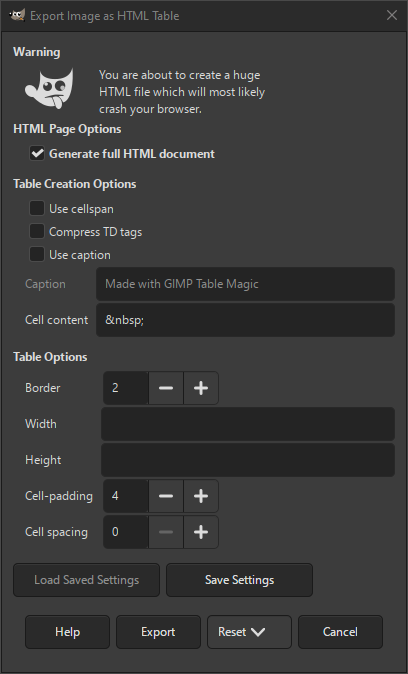
La finestra di dialogo di esportazione Tabella HTML consente di esportare l'immagine come file HTML, dove l'immagine è rappresentata da una tabella di quadrati colorati. Un esportatore simile è Testo HTML colorato.
Si può esportare l'immagine in questo formato scegliendo l'estensione «.htm» oppure scegliendo esplicitamente «Tabella HTML» come tipo di file nella finestra di dialogo di esportazione.
![[Avvertimento]](images/warning.png)
|
Avvertimento |
|---|---|
|
Questa operazione genera tabelle HTML molto grandi, anche per immagini di piccole dimensioni. Questo può rallentare o addirittura bloccare un browser. |
- Opzioni pagina HTML
-
- Genera documento HTML completo
-
Se selezionata, verrà generato un documento HTML completo, anziché solo il codice HTML della tabella.
- Opzioni di creazione della tabella
-
- Usa cellspan
-
Se abilitata, le sezioni rettangolari di blocchi dello stesso colore verranno sostituite da una cella grande con i marcatori HTML
ROWSPANeCOLSPANimpostati sulla dimensione corretta. - Comprimi marcatori TD
-
Se abilitata, non verrà aggiunto alcuno spazio vuoto tra i marcatori HTML
TDe il contenuto della cella. Questa opzione è necessaria solo per il controllo del posizionamento a livello di pixel. - Usa intestazione
-
Se abilitata, verrà aggiunta una didascalia sopra la tabella.
- Intestazione
-
Inserire qui il testo della didascalia per la tabella HTML.
- Contenuto cella
-
Inserire il testo o il carattere da utilizzare come contenuto della cella. L'impostazione predefinita sarà un blocco colorato vuoto.
- Opzioni tabella
-
- Bordo
-
La dimensione in pixel del bordo della tabella.
- Larghezza, Altezza
-
Imposta le dimensioni di ogni cella della tabella. Si può inserire un numero di pixel o una percentuale.
- Bordatura-celle
-
La quantità di riempimento del bordo delle celle.
- Spaziatura celle
-
La quantità di spaziatura tra le celle.


