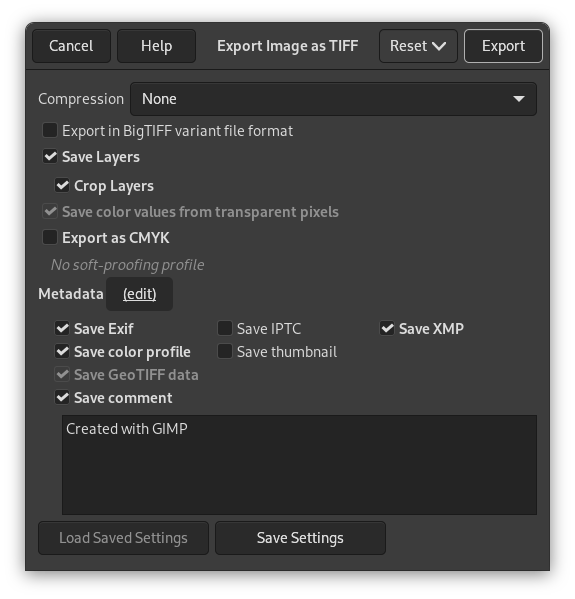
- Compressió
-
Aquesta opció permet especificar l'algoritme utilitzat per comprimir la imatge.
- Cap
-
No compression is used. This is fast, and lossless, but the resulting file can be very large.
- LZW
-
The image is compressed using the «Lempel-Ziv-Welch» algorithm, a lossless compression technique. This is efficient and fast. More information at [WKPD-LZW].
- Pack Bits
-
This is a fast, simple compression scheme for run-length encoding of data. Apple introduced the PackBits format with the release of MacPaint on the Macintosh computer.
A PackBits data stream consists of packets of one byte of header followed by data. (Source: [WKPD-PACKBITS])
- Deflate
-
This is a lossless data compression algorithm that uses a combination of the LZ77 algorithm and Huffman coding. It is also used in Zip and Gzip files and PNG images. Source: [WKPD-DEFLATE].
- JPEG
-
This is a very good compression algorithm but lossy. This is the same compression as used in JPEG images. Since it is lossy, you should not use this when image quality is important. This compression can not be used when your image is in indexed mode.
- CCITT Group 3 fax, CCITT Group 4 fax
-
These are black and white formats developed to transfer images by FAX.
![[Nota]](images/note.png)
Nota Aquestes dues opcions només es poden seleccionar, si la imatge està en mode indexat i reduïda a dos colors. Utilitzeu → → per a convertir la imatge a mode indexat. Assegureu-vos de marcar «Utilitza la paleta en blanc i negre (1-bit)».
- Desa les capes
-
When enabled, each layer will be stored as a separate page in the TIFF image, starting from the bottom. When disabled, only the merged result will be stored.
Nota Not all image viewers support loading more than the first page of a TIFF image. Since the background layer is what we store first, it may be better to disable this setting if other programs you work with can't handle that.
- Retalla les capes
-
Quan Desa les capes està marcada, aquesta opció, que està habilitada per defecte, redimensionarà totes les capes a la mida de la imatge. Les imatges TIFF no poden tenir desplaçaments negatius. Aquesta opció us permet tornar a importar el TIFF sense haver de canviar la posició de les capes que tenen una mida diferent com a la imatge de l'original.
- Desa el valor dels colors dels píxels transparents
-
Quan aquesta opció està habilitada els valors del color es desen fins i tot si els píxels són completament transparents.
- Exporta com a CMYK
-
If you have a CMYK profile assigned to your image as soft-proofing profile, this setting can be checked to have your image exported using that CMYK profile. This is sometimes required when you have your image professionally printed. Your printing company will tell you if this is needed.
If this setting is disabled, you don't have a soft-proofing profile set for this image yet. See assigning a Soft-Proof Profile.
The name of the CMYK profile that is assigned to this image will be shown below this setting.
- Metadades (edició)
-
You can click the «(edit)» link to open the metadata editor to change or add any metadata that you want to be included in the image. Note: you will also still need to enable the relevant metadata saving options listed below.
The metadata settings in the export dialog override the default values set in your Metadata Export Preferences.
- Desa les dades EXIF
-
When this option is enabled, EXIF metadata will be saved in the exported image.
- Desa les dades IPTC
-
When this option is enabled, IPTC metadata will be saved in the exported image.
- Desa les dades XMP
-
When this option is enabled, XMP metadata will be saved in the exported image.
- Desa el perfil del color
-
When this option is enabled, the color profile will be saved in the exported image.
- Desa la miniatura
-
When this option is enabled a thumbnail will be saved in the exported image as part of the EXIF metadata. This will also cause certain EXIF tags to be saved, even if you have disabled saving EXIF metadata.
- Desa les dades GeoTIFF
-
Quan aquesta opció està habilitada les metadades GeoTIFF que estaven presents a la imatge original es desaran a la imatge TIFF exportada.
- Desa el comentari
-
Ací podeu activar el desament d'un comentari associat a la imatge. El comentari es pot introduir al quadre de text de sota aquesta opció.


