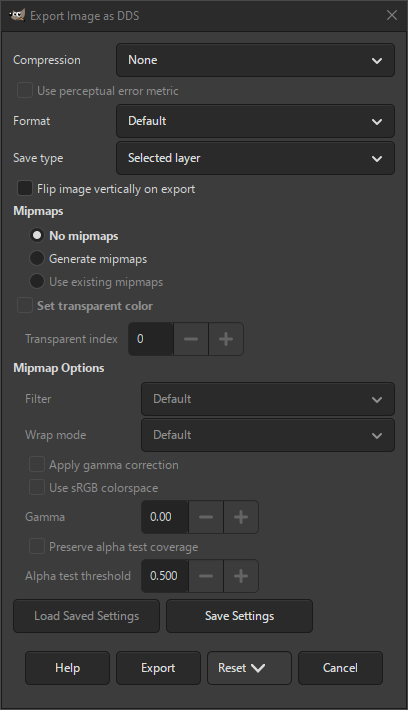
Il formato di file DDS è spesso utilizzato nei giochi per memorizzare texture e mappe ambientali. Supporta sia texture compresse che non compresse.
Nella maggior parte dei casi, i motori di gioco richiedono che le dimensioni delle texture siano una potenza di due, ma larghezza e altezza non devono essere necessariamente uguali. I valori più comuni sono 64, 128, 256, 512, ecc.
- Compressione
-
Tipo di compressione da utilizzare. Se impostato su Nessuno, è possibile selezionare il formato non compresso da Formato.
Di solito i giochi supportano solo alcuni formati compressi e non compressi. Controllare la documentazione del gioco per scoprire quali modalità supportano.
- Nessuno
-
I dati dell'immagine vengono memorizzati non compressi. Il formato effettivo è determinato dall'impostazione Formato.
- BC1 / DXT1
-
Memorizza 5 bit di rosso, 6 bit di verde e 5 bit di blu per colore. Se è presente un canale alfa, viene memorizzato solo 1 bit di alfa (completamente trasparente o completamente opaco), sottraendo 1 bit di verde.
Questo formato crea file di dimensioni minime. Non funziona bene con immagini che presentano improvvisi cambiamenti di colore, come la pixel art. In generale, non è consigliato quando si ha un canale alfa.
- BC2 / DXT3
-
Memorizza i colori come DXT1, ma memorizza anche tutti i canali alfa. Questo formato è raramente utilizzato.
- BC3 / DXT5
-
Memorizza i colori come DXT1, ma supporta tutti i canali alfa, che memorizza pre-moltiplicati.
In generale preferibile a DXT3 e comunemente utilizzato quando i canali alfa sono importanti.
- BC3nm / DXT5nm
-
Una variante di DXT5 utilizzata per memorizzare mappe semplici.
- BC4 / ATI1 (3Dc+)
-
Questa opzione viene utilizzata per memorizzare un solo canale colore. In un'immagine a colori, verrà memorizzato solo il canale rosso. Gli altri canali, così come il canale alfa, verranno ignorati.
- BC5 / ATI2 (3Dc)
-
Questa opzione viene utilizzata per memorizzare due canali colore. In un'immagine a colori, verranno memorizzati solo i canali rosso e verde. Il canale blu verrà ignorato, così come il canale alfa.
- BC7
-
Questo formato supporta motivi RGB e RGBA a 8 bit. Fornisce lo stesso livello di compression del BC3, mantenendo al contempo una migliore qualità dal sorgente originale non compresso.
- RXGB (DXT5)
-
Una variante di DXT5. È raramente utilizzata e richiede il supporto esplicito del gioco che la utilizza.
- Esponente alfa (DXT5)
-
Una variante di DXT5 che ha un canale alfa altamente compresso.
- YCoCg (DXT5)
-
Una variante speciale di DXT5 che converte i canali colore RGB in YCoCg, consentendo una compressione delle immagini di alta qualità. Richiede il supporto esplicito del gioco che la utilizza.
- YCoCg scalato (DXT5)
-
Come sopra, ma migliora la qualità dei pixel a scapito di tempi di elaborazione più lunghi. Richiede il supporto esplicito del gioco che lo utilizza.
- Usa la metrica di errore percettivo
-
Questa impostazione è abilitata solo quando la compressione non è impostata su Nessuna. L'abilitazione di questa impostazione può migliorare la qualità visiva in alcuni casi.
- Formato
-
Questa impostazione determina il formato colore per le trame non compresse. Esiste un'ampia gamma di formati, ma non tutti sono supportati allo stesso modo da giochi e visualizzatori di immagini.
- Predefinito
-
Sceglie il formato più adatto in base al tipo di immagine.
- RGB8
-
Questo formato memorizza 8 bit per canale per rosso, verde e blu.
- RGBA8
-
Questo formato memorizza 8 bit per canale per rosso, verde, blu e alfa.
- BGR8
-
Questo formato memorizza 8 bit per canale in ordine inverso per blu, verde e rosso.
- ABGR8
-
Questo formato memorizza 8 bit per canale in ordine inverso, con prima il canale alfa, poi il blu, il verde e il rosso.
- R5G6B5
-
Questo formato memorizza 5 bit di rosso, 6 bit di verde e 5 bit di blu.
- RGBA4
-
Questo formato memorizza 4 bit di rosso, verde, blu e alfa.
- RGB5A1
-
Questo formato memorizza 5 bit di rosso, verde e blu, con un bit di alfa.
- RGB10A2
-
Questo formato memorizza 10 bit di rosso, verde e blu, con due bit di alfa.
- R3G3B2
-
Questo formato memorizza tre bit di rosso e verde e due bit di blu.
- A8
-
Questo formato memorizza una singola componente di 8 bit, ricavata dal canale alfa.
- L8
-
Questo formato memorizza una singola componente di 8 bit, ricavata dal canale rosso o dalla scala di grigi. Viene spesso utilizzato per migliorare la luminanza.
- L8A8
-
Questo formato memorizza due componenti da 8 bit, ricavate dai canali rosso o scala di grigi e alfa. Viene spesso utilizzato per migliorare la luminanza.
- AEXP
-
Sta per «Alpha Exponent» e utilizza lo stesso algoritmo della compressione Esponente alfa (DXT5).
Questa opzione viene usata raramente. Verificare prima che sia supportata e richiesta dal proprio motore di gioco.
- YCOCG
-
Usa lo stesso algoritmo della compressione YCoCg (DXT5).
Questa opzione viene usata raramente. Verificare prima che sia supportata e richiesta dal proprio motore di gioco.
- Salva tipo
-
Questo determina come verrà salvata l'immagine.
- Livello selezionato
-
Verrà esportato solo il livello attualmente selezionato.
- Tutti i livelli visibili
-
Tutti i livelli visibili verranno fusi e poi esportati.
- Come mappa cubica
-
Il livello selezionato verrà esportato come mappa cubica. Una mappa cubica è una disposizione speciale di motivi correlati, in cui ogni livello rappresenta una faccia di un cubo.
Una mappa cubica richiede sei livelli tutti della stessa dimensione, con o senza trasparenza. Ogni livello deve avere uno degli identificatori corretti alla fine del nome del livello.
Questi identificatori sono «Front», «Back», «Left», «Right», «Top», «Bottom». Ad esempio, dei livelli potrebbero essere denominati: «woodland_front», «woodland_back», ecc.
Questa impostazione è abilitata solo quando sono soddisfatte le condizioni di cui sopra.
- Come mappa volumetrica
-
Il livello selezionato verrà esportato come mappa volumetrica. Una mappa volumetrica è simile a una mappa cubica, ma i motivi non devono necessariamente far parte di un cubo, quindi non è richiesto un numero fisso di livelli.
Anche le mappe volumetriche richiedono che tutti i livelli abbiano le stesse dimensioni, con o senza trasparenza. Tuttavia, non vi sono limiti al numero di livelli che si desidera utilizzare e non è richiesta alcuna denominazione specifica per i livelli.
Questa impostazione è abilitata solo quando sono soddisfatte le condizioni di cui sopra.
- Come schiera di trame
-
L'immagine verrà esportata come schiera di trame. Verranno esportati solo i livelli che hanno le stesse dimensioni dell'immagine. In questo modo, una raccolta di trame viene salvata in un'unica immagine.
Questa impostazione è abilitata solo quando sono presenti almeno due livelli.
- Capovolgi l'immagine verticalmente durante l'esportazione
-
Alcuni motori di gioco richiedono che l'immagine sia capovolta. Abilitando questa impostazione, questa operazione verrà eseguita automaticamente.
- Mipmaps
-
Le mipmap sono versioni ridotte della stessa immagine, in cui ogni mipmap ha larghezza e altezza pari alla metà della precedente. Spesso utilizzate nei motori di gioco per migliorare il caricamento nelle scene in cui l'oggetto si trova a grande distanza.
- Nessuna mipmap
-
Nessuna mipmap viene aggiunta all'immagine esportata.
- Genera mipmap
-
Vengono create nuove mipmap e aggiunte all'immagine esportata.
- Usa mipmap esistenti
-
Le mipmap già disponibili nell'immagine verranno riutilizzate e aggiunte all'immagine esportata. Questa opzione sarà abilitata solo se è disponibile il numero corretto di mipmap con le dimensioni previste.
- Imposta colore trasparenza
-
Se selezionata, questa opzione utilizza il colore indicizzato specificato di seguito per impostare la trasparenza nell'immagine esportata. Questa impostazione è abilitata solo quando l'immagine è in modalità indicizzata.
- Indice trasparenza
-
Quando l'impostazione precedente è selezionata e abilitata, è possibile specificare quale indice della tavolozza deve essere utilizzato per la trasparenza nell'immagine esportata.
- Opzioni mipmap
-
Le seguenti opzioni sono abilitate solo quando si aggiungono mipmap all'immagine.
- Filtro
-
Questa impostazione determina quale filtro verrà utilizzato per l'interpolazione quando si riduce l'immagine per creare una mipmap.
- Predefinito
-
Non viene applicato alcun filtro per creare la mipmap. Ciò può causare anomalie visive, come bordi eccessivamente nitidi e artefatti a gradini.
- Più vicino
-
Questo è un filtro bilineare, che consente una migliore commutazione tra mipmap.
- Scatolare
-
Filtro scatolare polifase. A parte i filtri Lanczos e Kaiser, è una buona scelta per la maggior parte dei casi ed è anche molto più veloce di altri filtri.
- Triangolare
-
Questo filtro utilizza un filtro triangolare. Il kernel ha una larghezza maggiore e quindi produce risultati più sfocati rispetto al filtro Scatolare.
- Quadratico
-
Questo è un tipo di filtro gaussiano.
- B-Spline
-
Questo è un filtro trilineare.
- Mitchell
-
Questo filtro viene utilizzato principalmente per ridurre la perdita di dettagli durante il sovracampionamento.
- Catmull-Rom
-
- Lanczos
-
Questo filtro è simile al filtro Kaiser. I risultati sono solitamente indistinguibili tra i due. Lanczos potrebbe gestire meglio le risonanze e gli artefatti. Questo filtro può essere ulteriormente ottimizzato utilizzando l'impostazione Modalità a capo.
- Kaiser
-
Questo filtro è generalmente considerato la scelta migliore per il downsampling, ma per ottenere risultati ottimali è consigliabile sperimentare con l'impostazione Modalità a capo. In caso contrario, le immagini risultanti potrebbero presentare artefatti di fringing o il risultato potrebbe non essere nitido come desiderato.
- Modalità a capo
-
Quando si valuta il colore dei pixel che si trovano vicino al bordo, la maggior parte dei filtri solitamente campiona al di fuori della trama. Questa impostazione determina come vengono gestiti questi campioni.
- Predefinito
-
In genere, questa impostazione è abbastanza buona, anche se è possibile ottenere risultati migliori specificando esplicitamente una delle modalità seguenti.
- Specchio
-
Rifletti viene utilizzato per molte altre operazioni di elaborazione delle immagini, come la generazione di mappe normali, ed è generalmente considerato l'opzione migliore. Preleva i dati dall'altro lato dell'immagine.
- Ripeti
-
I dati vengono spostati all'esterno dei bordi, partendo dal valore appena al loro interno.
- Blocca
-
I dati esterni ai bordi vengono bloccati sui valori presenti sui bordi.
- Applica correzione gamma
-
Se selezionata, questa opzione utilizza la correzione gamma per il filtraggio mipmap. Questa opzione regola la riflettività di un oggetto, rendendo l'intera immagine più chiara o più scura, a seconda del valore utilizzato di seguito.
- Usa lo spazio colore sRGB per la correzione gamma
-
Se selezionata, utilizza lo spazio colore sRGB per la correzione gamma delle mipmap.
- Gamma
-
Qui si può impostare il valore Gamma desiderato da utilizzare per la correzione gamma.
- Mantieni copertura test alfa
-
Se selezionata, questa opzione preserva la copertura del test alfa per le mappe del canale alfa, in base a una soglia impostata di seguito.
- Soglia test alfa
-
Il valore soglia da utilizzare per preservare la copertura del test dei canali alfa.


