Филтер „Обоји“ исцртава активни слој или избор као сивотону слику виђену кроз обојено стакло. Можете га користити да, на пример, примените ефекат „Сепије“ на своју слику.
![[Савет]](images/tip.png)
|
Савет |
|---|---|
|
Овај филтер користи ХСЛ модел боја. Претходна издања Гимпа укључивала су сличан филтер, „Колорифај“, који је уместо тога користио ХСВ модел. То дејство се и даље може постићи коришћењем одређених параметара (као што су Засићеност=1.0 и Светлина=-0.5), или одређивањем Засићености=0.0 и примењивањем нијансе боје као засебан корак. |
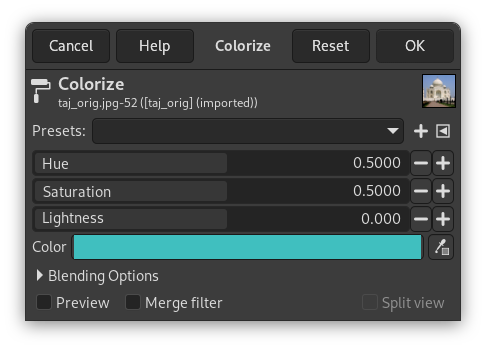
- Предподешавања, Опције за стапање, Преглед, Филтери за спајање, Подељени приказ
-
![[Примедба]](images/note.png)
Примедба Ове опције су описане у Одељак 8.1.2, „Заједничке могућности боја“.
- Нијанса
-
Која боја се примењује на слику. Напомена: иако се нијанса обично приказује у степенима (од 0 до 360), овде се приказује од 0.0 до 1.0. Нијанса од 36° би се, на пример, унела као 0.1.
- Засићење
-
Интензитет боје, ако постоји. Ово се такође изражава у опсегу од 0.0 до 1.0, где 0.0 даје само сивотоно претварање, а 1.0 примењује чисту РГБ боју (изабране нијансе).
- Осветљење
-
Осветљење резултата. Ово је изражено у ХСЛ појмовима, у опсегу од -1,0 (црна) до 0,0 (нормална) до +1,0 (бела).
- Боја
-
Помоћу дугмета за боју (или бирача боје) можете брзо изабрати боју која се користи за бојење ваше слике: овде изабрана боја прилагодиће клизаче изнад како би се поклопили.
|
|
Примедба |
|---|---|
|
Видите ХСЛ за више података о нијанси, засићености и светлини уопште. |


