Il filtro Colorizza rende il livello o la selezione attivi un'immagine in scala di grigi come vista attraverso un vetro colorato. Può essere usato, per esempio, per dare un effetto «Seppia» all'immagine.
![[Suggerimento]](images/tip.png)
|
Suggerimento |
|---|---|
|
Questo filtro utilizza il modello di colore HSL. Le versioni precedenti di GIMP includevano un filtro simile, Colorazione, che utilizzava invece il modello HSV. Tale effetto può ancora essere riprodotto utilizzando parametri specifici (come Saturazione=1.0 e Luminosità=-0.5), oppure specificando Saturazione=0.0 e applicando la tinta di colore come passaggio separato. |
È possibile accedere a questo comando dal menu principale tramite → .
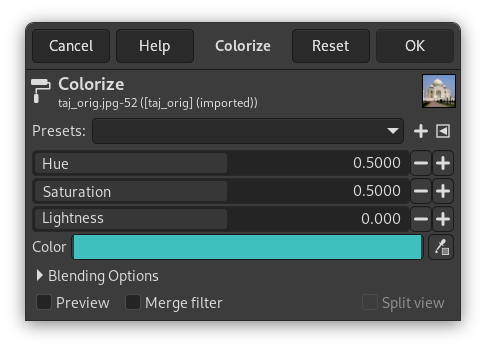
- Preimpostazioni, Opzioni di fusione, Anteprima, Fondi filtro, Dividi vista
-
![[Nota]](images/note.png)
Nota Queste opzioni sono descritte in Sezione 8.1.2, «Caratteristiche comuni dei colori».
- Tonalità
-
Quale tonalità applicare all'immagine. Si noti che, mentre la tonalità viene normalmente visualizzata in gradi (da 0 a 360), qui viene visualizzata da 0,0 a 1,0. Una tonalità di 36° verrebbe inserita come 0,1, ad esempio.
- Saturazione
-
L'intensità della tinta di colore, se presente. Anche questa è espressa in un intervallo da 0,0 a 1,0, dove 0,0 produce solo una conversione in scala di grigi e 1,0 applica una tinta di colore RGB pura (della tonalità selezionata).
- Luminosità
-
La luminosità del risultato. Questa viene espressa in termini HSL, in un intervallo da -1,0 (nero) a 0,0 (normale) a +1,0 (bianco).
- Colore
-
Usando il pulsante del colore (o il prelievo colore), si può selezionare rapidamente il colore da utilizzare per colorare l'immagine. Selezionando un colore qui, i cursori sovrastanti si regoleranno di conseguenza.
|
|
Nota |
|---|---|
|
Per ulteriori informazioni su tonalità, saturazione e luminosità in generale, consultare il HSL . |


