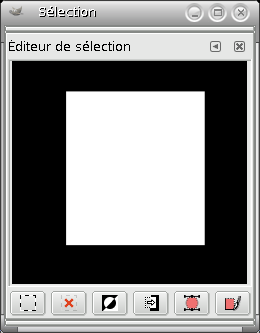
Cet éditeur doit être considéré comme une aide plutôt que comme un outil de travail. Si vous travaillez sur une sélection dans l’image, vous trouverez pratique de pouvoir accéder d’un simple clic de souris aux commandes concernant les sélections, regroupées dans une seule fenêtre, plutôt que d’avoir à les rechercher dans l’arbre des commandes de la barre de menus. L’aperçu n’est là que pour indiquer la sélection active. Mais cet éditeur vous offre plusieurs options avancées concernant Sélection vers Chemin.
- Les boutons
-
Cet éditeur regroupe plusieurs fonctions des sélections auxquelles vous pouvez accéder facilement par un simple clic sur un bouton :
-
 The Select All
button.
The Select All
button.
-
 The Select None
button.
The Select None
button.
-
 The Select Invert
button.
The Select Invert
button.
-
 The Save to
Channel button.
The Save to
Channel button.
-
 The To Path
button. If you hold the Shift key while
clicking on this button, the
Advanced
Settings dialog is displayed. Please see the next section
for details about these options.
The To Path
button. If you hold the Shift key while
clicking on this button, the
Advanced
Settings dialog is displayed. Please see the next section
for details about these options.
-
 The Stroke
Selection button.
The Stroke
Selection button.
-
- La fenêtre d’affichage
-
Ici, les régions sélectionnées sont en blanc, les régions non sélectionnées en noir, et les régions partiellement sélectionnées en niveaux de gris. Le fait de cliquer sur cette fenêtre agit comme l’outil Sélection par couleur : si quelqu’un peut expliquer cette fonction à l’aveugle…
Figure 16.20. Exemple de clic dans la fenêtre de l’« Éditeur de sélection »
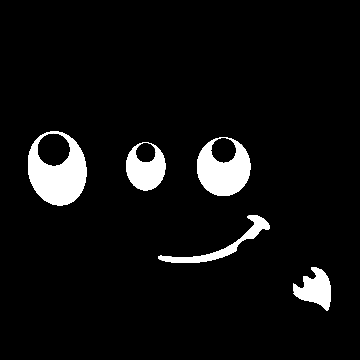
Selection Editor window after clicking.

Image with the resulting selection applied.
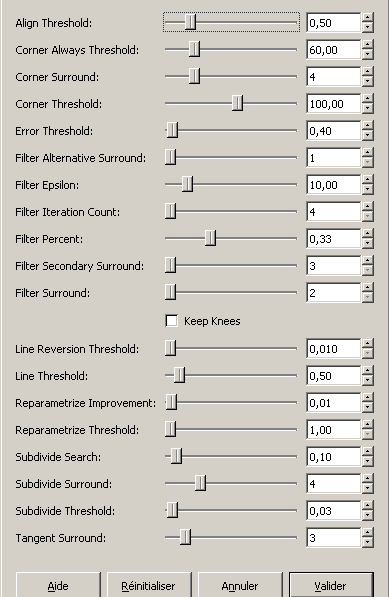
La fenêtre de dialogue « Réglages avancés » que vous obtenez en appuyant sur Maj et en cliquant sur le bouton Sélection vers Chemin de l’Éditeur de sélection, vous offre plusieurs options pour paramétrer le tracé du chemin. Ces options sont surtout à l’usage des développeurs. Voici la traduction des bulles d’aides qui apparaissent en passant le pointeur de la souris sur le nom des options :
- Align Threshold
-
If two endpoints are closer than this value, they are made to be equal.
- Corner Always Threshold
-
If the angle defined by a point and its predecessors and successors is smaller than this, it is a corner, even if it is within Corner Surround pixels of a point with a smaller angle.
- Corner Surround
-
Number of points to consider when determining if a point is a corner or not.
- Corner Threshold
-
If a point, its predecessors, and its successors define an angle smaller than this, it is a corner.
- Error Threshold
-
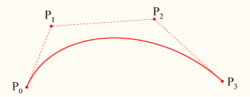
Amount of error at which a fitted spline[4] is unacceptable. If any pixel is further away than this from the fitted curve, the algorithm tries again.
- Filter Alternative Surround
-
A second number of adjacent points to consider when filtering.
- Filter Epsilon
-
If the angles between the vectors produced by Filter Surround and Filter Alternative Surround points differ by more than this, use the one from Filter Alternative Surround.
- Filter Iteration Count
-
The number of times to smooth the original data points. Increasing this number dramatically, to 50 or so, can produce vastly better results. But if any points that « should » be corners aren't found, the curve goes wild around that point.
- Filter Percent
-
To produce the new point, use the old point plus this times the neighbors.
- Filter Secondary Surround
-
Number of adjacent points to consider if Filter Surround points defines a straight line.
- Filter Surround
-
Number of adjacent points to consider when filtering.
- Keep Knees
-
This check box says whether or not to remove « knee » points after finding the outline.
- Line Reversion Threshold
-
If a spline is closer to a straight line than this value, it remains a straight line, even if it would otherwise be changed back to a curve. This is weighted by the square of the curve length, to make shorter curves more likely to be reverted.
- Line Threshold
-
How many pixels (on the average) a spline can diverge from the line determined by its endpoints before it is changed to a straight line.
- Reparametrize Improvement
-
If reparameterization doesn't improve the fit by this much percent, the algorithm stops doing it.
- Reparametrize Threshold
-
Amount of error at which it is pointless to reparameterize. This happens, for example, when the algorithm is trying to fit the outline of the outside of an « O » with a single spline. The initial fit is not good enough for the Newton-Raphson iteration to improve it. It may be that it would be better to detect the cases where the algorithm didn't find any corners.
- Subdivide Search
-
Percentage of the curve away from the worst point to look for a better place to subdivide.
- Subdivide Surround
-
Number of points to consider when deciding whether a given point is a better place to subdivide.
- Subdivide Threshold
-
How many pixels a point can diverge from a straight line and still be considered a better place to subdivide.
- Tangent Surround
-
Number of points to look at on either side of a point when computing the approximation to the tangent at that point.