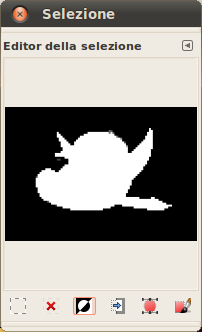
Il comando mostra la finestra di «modifica (del)la selezione». Questa finestra di dialogo mostra la selezione attiva nell'immagine corrente e permette un facile accesso ai comandi che riguardano la selezione. Essa non è realmente intesa per modificare direttamente le selezioni ma, se si sta lavorando su una selezione, è comodo avere sottomano tutti i comandi relativi, dato che è molto più semplice fare clic su un pulsante che non cercare il comando in un albero di menu. La «Modifica (del)la selezione» offre anche alcune impostazioni avanzate per il comando «Selezione a tracciato».
È possibile accedere a questo comando dal menu principale tramite → .
- I pulsanti
-
La finestra di dialogo «Editor della selezione» possiede diversi pulsanti che possono essere usati per accedere comodamente ai comandi di selezione:
-
 Il pulsante Seleziona tutto.
 -
 Il pulsante Seleziona niente.
 -
 Il pulsante Inverti selezione.
 -
 Il pulsante Salva sul canale.
 -
 Il pulsante A tracciato. Se si tiene premuto il tasto Maiusc mentre si fa clic su questo pulsante, viene visualizzata la finestra di dialogo Impostazioni avanzate. Per i dettagli su queste opzioni, consultare la sezione successiva.
 -
 Il pulsante Delinea la selezione.
-
- La finestra di monitor
-
Nella finestra di monitor, le aree selezionate dell'immagine vengono visualizzate come bianche, mentre quelle non visualizzate come nere e quindi quelle parzialmente selezionate sono in scala di grigi. Facendo clic su quest'immagine si agisce come in una Selezione per colore. Vedere l'esempio più avanti.
Figura 16.20. Esempio di clic sulla finestra monitor dell'«Editor della selezione»

La finestra di modifica della selezione dopo il clic.

Immagine con la selezione risultante applicata.
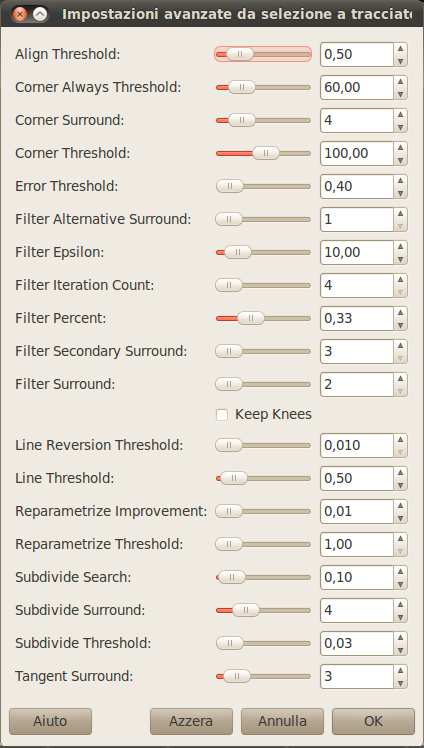
La finestra di dialogo «Impostazioni avanzate da selezione a tracciato» che si ottiene facendo clic con il tasto maiusc premuto sul pulsante , contiene molte regolazioni, delle quali diverse sono impostabili con un cursore o con una casella di immissione dati. Queste opzioni sono usate principalmente da utenti avanzati. Eccole:
- Soglia allineamento
-
Se due capi sono più vicini di un certo valore, vengono resi uguali.
- Soglia sempre spigolo
-
Se l'angolo definito da un punto ed i suoi precedenti e successivi è inferiore a questo valore, esso viene considerato uno spigolo anche se è dentro ai punti di Intorno spigolo di un punto con un angolo inferiore.
- Intorno spigolo
-
Numero di punti da considerare nel determinare se un punto è uno spigolo o no.
- Soglia spigolo
-
Se un punto, i suoi precedenti e i suoi successivi definiscono un angolo più piccolo di questo valore, è uno spigolo.
- Soglia errore
-
Qrandezza dell'errore alla quale una spline fittata [6] è inaccettabile. Se esistono dei pixel distanti oltre questo valore dalla curva fittata, l'algoritmo riprova.
- Intorno spigolo alternativo
-
Numero di punti adiacenti da considerare durante la filtratura.
- Epsilon filtro
-
Se gli angoli tra i vettori prodotti da i punti di Intorno filtro e Intorno filtro alternativo differiscono più di questo valore, usa il valore di Intorno filtro alternativo.
- Conteggio iterazioni filtro
-
Il numero di volte necessario per smussare i dati dei punti originali. Incrementando molto questo numero fino a valori intorno a 50 o più, può produrre risultati molto migliori, ma se un qualsiasi punto che «dovrebbe» essere parte di uno spigolo non viene trovato, la curva "impazzisce" attorno a quel punto.
- Percento filtro
-
Per produrre il nuovo punto, usa il punto vecchio più questo valore volte i vicini.
- Intorno filtro secondario
-
Numero di punti adiacenti da considerare se i punti di Intorno filtro definiscono una linea retta.
- Intorno filtro
-
Numero di punti adiacenti da considerare durante la filtratura.
- Mantieni ginocchia
-
Questa opzione serve a decidere se mantenere oppure rimuovere i punti «ginocchia (knee)» dopo aver trovato la curva.
- Soglia di inversione linea
-
Se una spline è più vicina ad una linea retta di questo valore, essa rimane una linea retta, anche se sarebbe altrimenti ritrasformata in una curva. Questo valore è pesato dal quadrato della lunghezza della curva, per fare in modo che le curve più corte abbiano maggiori probabilità di essere riconvertite.
- Soglia linea
-
Di quanti pixel (in media) una spline può divergere dalla linea determinate dai suoi capi prima che sia cambiata in una linea retta.
- Miglioramento riparametrizzazione
-
Se una riparametrizzazione non migliora il fit di questo valore in percentuale, l'algoritmo si ferma.
- Soglia di riparametrizzazione
-
Ammontare dell'errore al quale non ha senso riparametrizzare. Questo succede, per esempio, quando l'algoritmo sta tentando di fare il fit del profilo dell'esterno di uno «O» con una singola spline. Il fit iniziale non è abbastanza buono per l'iterazione Newton-Raphson per migliorarlo. Potrebbe essere che sia meglio individuare i casi dove l'algoritmo non trova alcuno spigolo.
- Ricerca suddivisione
-
Percentuale della curva lontano dal peggiore punto da osservare per cercare un punto migliore da suddividere.
- Intorno suddivisione
-
Numero di punti da considerare quando deve decidere se un dato punto è un punto migliore per suddividere.
- Soglia suddivisione
-
Di quanti pixel un punto può divergere da una linea retta ed essere ancora considerato un punto migliore per suddividere.
- Intorno tangente
-
Numero di punti da studiare da entrambe le parti di un punto quando si calcola l'approssimazione alla tangente a quel punto.