Kommandoen opnar eit dialogvindauge som viser utvalet i det gjeldande biletet. Det er eigentleg ikkje meininga at du skal arbeida direkte på utvala frå dette vindauget, men du får tilgang til ein del knappar med ulike kommandoar. Har du «utvalshandsamaren» framme, er det enklare å byta mellom ulike kommandoar ved å klikka på desse knappane enn å leita dei fram frå biletmenyen. Utvalshandsamaren tilbyr også ein del avanserte innstillingar for kommandoen «Utval til bane».
- Knappane
-
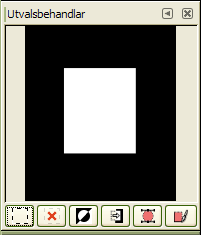
Dialogvindauget for «utvalshandsamaren» inneheld fleire knappar som gjev deg lett tilgang til ulike kommandoar:
-
 Knappen Vel alle.
 -
 Knappen Ingen.
 -
 Knappen Inverter utvalet.
 -
 Knappen Lagra til kanal.
 -
 Knappen Til bane. Dersom du held nede Shift-tasten medan du klikkar på denne knappen, vil dialogvindauget for Avanserte innstillingar dukka opp. Sjå neste avsnitt for meir om desse innstillingane.
 -
 Knappen Strek opp utvalet.
-
- Visingsvindauget
-
I dette vindauget vert dei utvalde områda viste med kvit farge, dei områda som ikkje er utvalde med svart, og delvis utvalde område i ulike grader av grått. Klikkar du i dette vindauget, er dette det same som å klikka på verktøyet Vel etter farge. Sjå eksemplet nedanfor.
Figur 16.20. Resultatet av å klikka i vindauget til «utvalshandsamaren»

Redigeringsvindauget etter klikking.

Biletet med resultatutvalet lagt til.
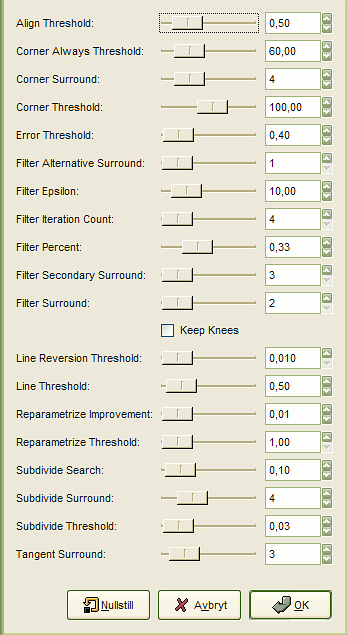
Dialogvindauget «Avanserte innstillingar for utval til bane», som du får fram ved å halde nede tasten Shift medan du klikkar på knappen , inneheld ein heil del innstillingar. Dei fleste kan setjast med glidebrytar, innskrivingsboks eller i eitt tilfelle også med avkryssingsboks. Dei aller fleste greier seg med nomalinnstillingane, men her er nokre forklaringar for dei som måtte ha bruk for å gjera endringar (Dialogvindauget er av ein eller annan grunn berre delvis opna for omsetting):
- Juster terskel
-
Dersom to endepunkt er nærare kvarandre enn denne grensa, vert dei kopla saman til eitt punkt.
- Hjørne alltid terskel
-
Dersom vinkelen definert i eit punkt, og vinklane like før og etter er mindre enn denne, vert punktet definert som eit hjørne, sjølv om det er innføre pikslane Hjørneomgjevnadar til eit punkt med mindre vinkel.
- Hjørneomgjevnadar
-
Kor mange punkt som skal telja med om eit punkt er eit hjørne eller ikkje.
- Hjørneterskel
-
Dersom eit punkt, og punkta like før og etter, definerer ein vinkel mindre enn dette, er det eit hjørne.
- Feilterskel
-
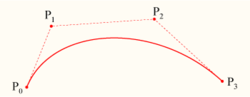
Kor mange feil for ein tilpassa spline [6] som er uakseptabelt. Dersom ein av pikslane er utanfor grensa, vil programmet prøva algoritmen på nytt.
- Filter alternative-omgjevnadar
-
Kor mange tilliggjande punkt som skal telja med ved filtrering.
- Filter Epsilon
-
Dersom vinklane mellom vektorane laga av Filteromgjevnadar og Filter alternative-omgjevnadar har større skilnad enn dette, bruk i staden data frå Filter alternative-omgjevnadar.
- Kor mange filtergjentakingar
-
Kor mange gonger originalpunktet skal glattast ut. Aukar du dette talet dramatisk, til t.d. rundt 50, kan resultatet verta merkbart betre. Men dersom det ikkje finst eit punkt som verkeleg skulle vera eit hjørne, kan kurvene verta nokså ville rundt dette punktet.
- Filter prosent
-
For å laga eit nytt punkt, bruk verdien av det gamle punktet pluss dette talet multiplisert med verdien av nabopunkta.
- Filter sekundære omgjevnadar
-
Talet på nærliggjande punkt som skal reknast med dersom Filteromgjevnadar definerer ei rett linje.
- Filteromgjevnadar
-
Kor mange tilliggjande punkt som skal telja med ved filtreringa.
- Behald kne
-
Bestemmer om «knepunkta» skal fjernast eller ikkje etter at omrisset er funne.
- Linjetilbakevendingsterskel
-
Dersom ei spline er nærare ei rett linje enn denne verdien, vil kurva framleis vere ei rett linje sjølv om ho elles ville vorte endra til ei bøygd kurve. Dette vert vekta med kvadratet av kurvelengda for å gjera det enklare å tilbakeføra korte kurver.
- Linjeterskel
-
Kor mange pikslar, i gjennomsnitt, ei kurve kan divergera frå ei linje som er definert ut frå endepunkta, før ho vert endra til ei rett linje.
- Reparametriser forbetring
-
Dersom omparametringa ikkje forbetrar tilpassinga med meir enn denne prosenten, stopp forsøket.
- Reparametrisk terskel
-
Feilgrense for når det er nyttelaust å omparametrisere. Dette kan oppstå når t.d. algoritmen prøver å tilpassa seg omrisset av ein «O» med ei enkel kurve. Den endelege tilpassinga er ikkje god nok for Newton-Raphson-repetisjonane til at resultatet vert ei forbetring. Kan hende ville det vera betre å finna dei tilfella der algoritmen ikkje finn nokre hjørner.
- Del søket vidare
-
Kor mange prosent kurva kan fjerna seg frå det verste punktet for å sjå etter ein betre plass for å dela vidare.
- Del omgjevnadane vidare
-
Kor mange punkt som skal telja med når det skal avgjerast om eit gjeve punkt er ein betre stad for å dela vidare.
- Vidaredelingsgrense
-
Kor mange pikslar eit punkt kan avvika frå ei rett linje og likevel vera ein betre plass for vidare oppdeling.
- Tangensomgjevnadar
-
Kor mange punkt som skal telja med på kvar side av eit punkt når tilnærminga av tangentane til dette punktet skal reknast ut.