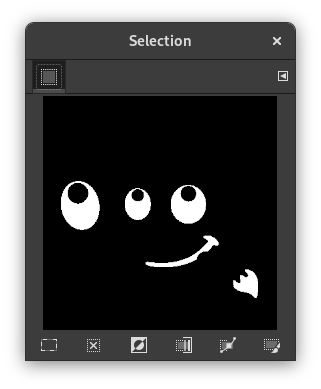
L'ordre mostra la finestra del diàleg «Editor de selecció». Aquest diàleg mostra la selecció activa en la imatge actual i dona un accés fàcil a les ordres relacionades amb la selecció. En realitat no té per objecte editar les seleccions directament, però si treballeu sobre una selecció, és còmode tenir a mà totes les ordres relacionades, és més fàcil fer clic sobre un botó que cercar ordres en l'arbre d'ordres de la barra de menú. L'«Editor de selecció» també ofereix algunes opcions avançades per a l'ordre «Selecció al camí».
- Botons
-
La finestra del diàleg «Editor de selecció» té alguns botons que podeu usar per a accedir còmodament a les ordres de selecció:
-
 El botó Selecciona-ho tot.
 -
 El botó No en seleccionis cap.
 -
 El botó Selecciona inversió.
 -
 El botó Desa al canal.
 -
 El botó Al camí. Si manteniu premuda la tecla Maj mentre feu clic en aquest botó, es mostrarà el diàleg «Configuració avançada». Per a més detalls sobre aquestes opcions, consulteu la següent secció.
 -
 El botó Selecció del traç.
-
- La finestra de mostra
-
En la finestra de mostra, les àrees seleccionades de la imatge són blanques, les no seleccionades negres, i les àrees parcialment seleccionades en nivells de grisos. Fer clic en aquesta finestra funciona com Selecciona per color. Vegeu l'exemple següent.
Figura 16.20. Exemple de fer clic en la finestra de mostra de l'«Editor de selecció»

Finestra de l'editor de selecció després de fer clic.

Imatge amb la selecció resultant aplicada.
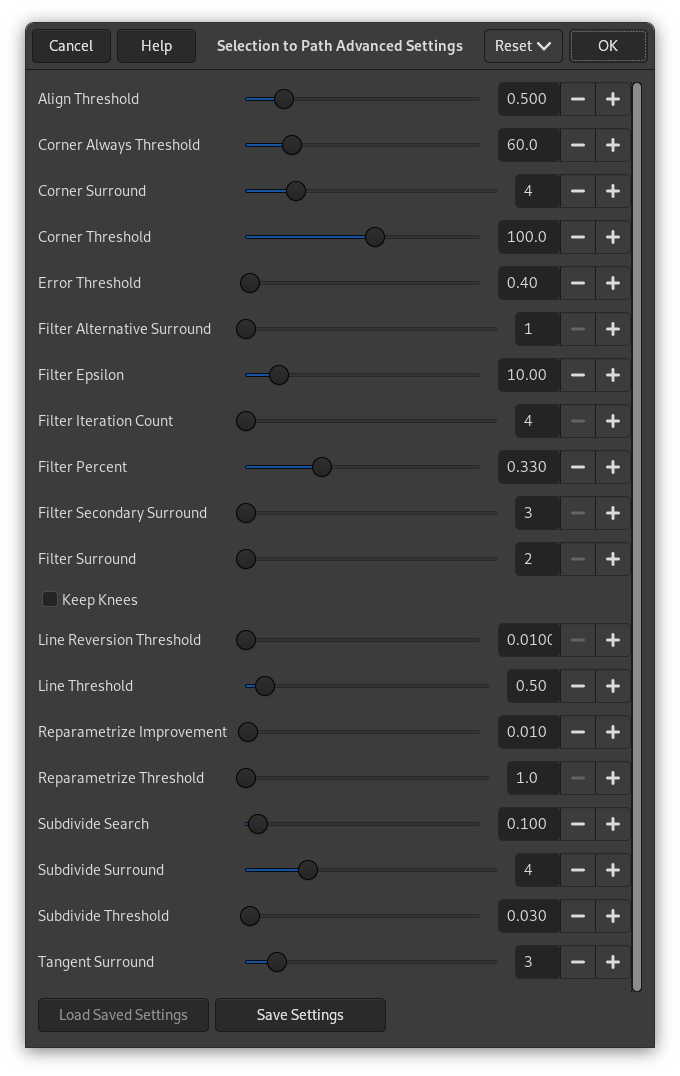
El diàleg «Paràmetres avançats de la selecció al camí», que s'obté en fer clic amb Maj sobre el botó , conté un nombre d'opcions, la majoria les podeu configurar amb un lliscador o una caixa de text. També hi ha una caixa de control. Aquestes opcions les usen principalment els usuaris avançats. Són:
- Align Threshold
-
If two endpoints are closer than this value, they are made to be equal.
- Corner Always Threshold
-
If the angle defined by a point and its predecessors and successors is smaller than this, it is a corner, even if it is within Corner Surround pixels of a point with a smaller angle.
- Corner Surround
-
Number of points to consider when determining if a point is a corner or not.
- Corner Threshold
-
If a point, its predecessors, and its successors define an angle smaller than this, it is a corner.
- Error Threshold
-
Amount of error at which a fitted spline[6] is unacceptable. If any pixel is further away than this from the fitted curve, the algorithm tries again.
- Filter Alternative Surround
-
A second number of adjacent points to consider when filtering.
- Filter Epsilon
-
If the angles between the vectors produced by Filter Surround and Filter Alternative Surround points differ by more than this, use the one from Filter Alternative Surround.
- Filter Iteration Count
-
The number of times to smooth the original data points. Increasing this number dramatically, to 50 or so, can produce vastly better results. But if any points that «should» be corners aren't found, the curve goes wild around that point.
- Filter Percent
-
To produce the new point, use the old point plus this times the neighbors.
- Filter Secondary Surround
-
Number of adjacent points to consider if Filter Surround points defines a straight line.
- Filter Surround
-
Number of adjacent points to consider when filtering.
- Keep Knees
-
This check box says whether or not to remove «knee» points after finding the outline.
- Line Reversion Threshold
-
If a spline is closer to a straight line than this value, it remains a straight line, even if it would otherwise be changed back to a curve. This is weighted by the square of the curve length, to make shorter curves more likely to be reverted.
- Line Threshold
-
How many pixels (on the average) a spline can diverge from the line determined by its endpoints before it is changed to a straight line.
- Reparametrize Improvement
-
If reparameterization doesn't improve the fit by this much percent, the algorithm stops doing it.
- Reparametrize Threshold
-
Amount of error at which it is pointless to reparameterize. This happens, for example, when the algorithm is trying to fit the outline of the outside of an «O» with a single spline. The initial fit is not good enough for the Newton-Raphson iteration to improve it. It may be that it would be better to detect the cases where the algorithm didn't find any corners.
- Subdivide Search
-
Percentage of the curve away from the worst point to look for a better place to subdivide.
- Subdivide Surround
-
Number of points to consider when deciding whether a given point is a better place to subdivide.
- Subdivide Threshold
-
How many pixels a point can diverge from a straight line and still be considered a better place to subdivide.
- Tangent Surround
-
Number of points to look at on either side of a point when computing the approximation to the tangent at that point.