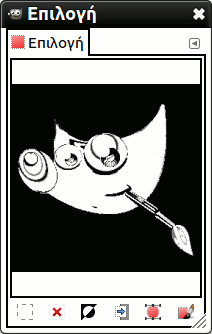
Η εντολή εμφανίζει το παράθυρο διαλόγου «Επεξεργασία επιλογής». Αυτό το παράθυρο διαλόγου εμφανίζει την ενεργή επιλογή στην τρέχουσα εικόνα και σας δίνει εύκολα πρόσβαση σε εντολές σχετικές με την επιλογή. Δεν αποσκοπεί πραγματικά για επεξεργασία επιλογών άμεσα, αλλά εάν δουλεύετε σε μια επιλογή, είναι βολικό να έχετε τις εντολές επιλογής όλες μαζί, αφού είναι πιο εύκολο το κλικ σε ένα κουμπί παρά η αναζήτηση εντολών στο δέντρο εντολών της γραμμής μενού. Η «Επεξεργασία επιλογής» επίσης προσφέρει μερικές προχωρημένες επιλογές για την εντολή «Επιλογή σε μονοπάτι».
Μπορείτε να προσπελάσετε αυτήν την εντολή από το κύριο μενού μέσα από → .
- Τα κουμπιά
-
Το παράθυρο διαλόγου «Επεξεργασία επιλογής» έχει πολλά κουμπιά που μπορείτε να χρησιμοποιήσετε για εύκολη πρόσβαση στις εντολές επιλογής:
-
 Το πλήκτρο Επιλογή όλων.
 -
 Το πλήκτρο Επιλογή καμιάς.
 -
 Το πλήκτρο Αντιστροφή επιλογής.
 -
 Το πλήκτρο Αποθήκευση σε κανάλι.
 -
 Το πλήκτρο Σε μονοπάτι. Εάν κρατήσετε πατημένο το πλήκτρο Shift πατώντας σε αυτό το πλήκτρο, εμφανίζεται ο διάλογος Προχωρημένες ρυθμίσεις. Παρακαλώ, δείτε την επόμενη ενότητα για λεπτομέρειες για αυτές τις επιλογές.
 -
 Το πλήκτρο Επιλογή πινελιάς.
-
- Το παράθυρο εμφάνισης
-
Στο παράθυρο εμφάνισης, οι επιλεγμένες περιοχές της εικόνας είναι λευκές, οι μη επιλεγμένες περιοχές είναι μαύρες και οι μερικώς επιλεγμένες περιοχές είναι αποχρώσεις του γκρι. Κλικ σε αυτό το παράθυρο δρα όπως η επιλογή κατά χρώμα. Δείτε το παράδειγμα πιο κάτω.
Σχήμα 16.20. Παράδειγμα κλικ στο παράθυρο εμφάνισης «Επεξεργασία επιλογής»

Το παράθυρο του επεξεργαστή επιλογής αφού πατήσετε.

Εικόνα με την τελική επιλογή που εφαρμόστηκε.
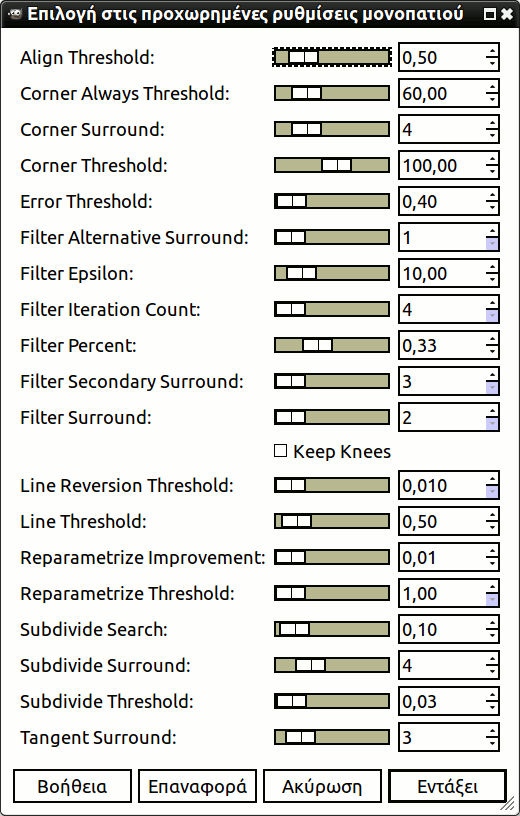
Ο διάλογος «Επιλογή σε προχωρημένες ρυθμίσεις μονοπατιού», που παίρνετε με Shift κλικ στο κουμπί , περιέχει έναν αριθμό επιλογών, τις περισσότερες από τις οποίες μπορείτε να ορίσετε με γραμμή ολισθητή ή πλαίσιο κειμένου. Υπάρχει επίσης ένα πλαίσιο ελέγχου. Αυτές οι επιλογές χρησιμοποιούνται κυρίως από προχωρημένους χρήστες. Είναι:
- Ευθυγράμμιση κατωφλίου
-
Εάν δύο τελικά σημεία είναι πιο κοντά από αυτήν την τιμή, τότε θεωρούνται ίσα.
- Κατώφλι γωνίας πάντα
-
Εάν η γωνία που ορίζεται από ένα σημείο και τους προκατόχους και τους διαδόχους του είναι μικρότερη από αυτήν, τότε πρόκειται για γωνία, ακόμα κι αν βρίσκεται εντός των εικονοστοιχείων Περιβάλλοντος γωνίας ενός σημείου με μικρότερη γωνία.
- Περιβάλλον γωνίας
-
Αριθμός σημείων που πρέπει να ληφθούν υπόψη κατά τον προσδιορισμό του εάν ένα σημείο είναι γωνία ή όχι.
- Κατώφλι γωνίας
-
Εάν ένα σημείο, τα προηγούμενά του και τα επόμενά του ορίζουν μια γωνία μικρότερη από αυτήν, τότε αυτό είναι γωνία.
- Κατώφλι σφάλματος
-
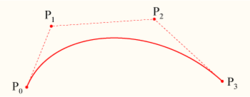
Ποσό σφάλματος στο οποίο μια προσαρμοσμένη εύκαμπτη καμπύλη [6] είναι μη αποδεκτή. Εάν οποιοδήποτε εικονοστοιχείο βρίσκεται σε μεγαλύτερη απόσταση από την προσαρμοσμένη καμπύλη, ο αλγόριθμος προσπαθεί ξανά.
- Εναλλακτικό περιβάλλον φίλτρου
-
Ένας δεύτερος αριθμός γειτονικών σημείων που πρέπει να ληφθούν υπόψη κατά το φιλτράρισμα.
- Φίλτρο Έψιλον
-
Εάν οι γωνίες μεταξύ των διανυσμάτων που παράγονται από τα σημεία Περιβάλλον φίλτρου και Εναλλακτικό περιβάλλον φίλτρου διαφέρουν περισσότερο από αυτό, χρησιμοποιήστε αυτό από το Εναλλακτικό περιβάλλον φίλτρου.
- Αριθμός επαναλήψεων φίλτρου
-
Ο αριθμός των φορών που εξομαλύνονται τα αρχικά σημεία δεδομένων. Η δραματική αύξηση αυτού του αριθμού, περίπου στις 50, μπορεί να αποφέρει πολύ καλύτερα αποτελέσματα. Αλλά εάν δεν βρεθούν σημεία που «θα έπρεπε» να είναι γωνίες, η καμπύλη γίνεται τρελή γύρω από αυτό το σημείο.
- Ποσοστό φίλτρου
-
Για δημιουργία του νέου σημείου, χρησιμοποιήστε το παλιό σημείο συν τόσες φορές τα γειτονικά.
- Δευτερεύον περιβάλλον φίλτρου
-
Αριθμός γειτονικών σημείων που θα ληφθούν υπόψη εάν τα σημεία Περιβάλλον φίλτρου ορίζουν μια ευθεία γραμμή.
- Περιβάλλον φίλτρου
-
Αριθμός γειτονικών σημείων που πρέπει να ληφθούν υπόψη κατά το φιλτράρισμα.
- Διατήρηση γονάτων
-
Αυτό το πλαίσιο ελέγχου υποδεικνύει εάν θα αφαιρεθούν ή όχι τα σημεία «γόνατος» μετά την εύρεση του περιγράμματος.
- Κατώφλι αναστροφής γραμμής
-
Εάν μια εύκαμπτη καμπύλη (spline) είναι πιο κοντά σε μια ευθεία γραμμή από αυτήν την τιμή, παραμένει ευθεία γραμμή, ακόμα κι αν διαφορετικά θα άλλαζε ξανά σε καμπύλη. Αυτό σταθμίζεται με το τετράγωνο του μήκους της καμπύλης, ώστε οι μικρότερες καμπύλες να είναι πιο πιθανό να αντιστραφούν.
- Κατώφλι γραμμής
-
Πόσα εικονοστοιχεία (κατά μέσο όρο) μια εύκαμπτη καμπύλη (spline) μπορεί να εκτρέψει από γραμμή που καθορίζεται από τα άκρα της, πριν μετατραπεί σε ευθεία γραμμή.
- Επαναπαραμετροποίηση Βελτίωσης
-
Εάν η νέα παραμετροποίηση δεν βελτιώνει την προσαρμογή κατά αυτό το ποσοστό, ο αλγόριθμος σταματά να το κάνει.
- Επαναπαραμετροποίηση κατωφλίου
-
Η ποσότητα σφάλματος στην οποία είναι άστοχο να έχουμε νέες παραμέτρους. Αυτό συμβαίνει, π.χ., όταν ο αλγόριθμος προσπαθεί να ταιριάξει το περίγραμμα του εξωτερικού ενός «O» με μια μοναδική εύκαμπτη καμπύλη (spline). Το αρχικό ταίριασμα δεν είναι αρκετά καλό για τη βελτίωση της επανάληψης Newton-Raphson. Ίσως είναι καλύτερη η ανίχνευση των περιπτώσεων όπου ο αλγόριθμος δεν βρίσκει γωνίες.
- Υποδιαίρεση αναζήτησης
-
Ποσοστό της καμπύλης μακριά από το χειρότερο σημείο για αναζήτηση καλύτερης θέσης υποδιαίρεσης.
- Υποδιαίρεση περιβάλλοντος
-
Ο αριθμός των σημείων για εξέταση όταν αποφασίζετε εάν ένα δοσμένο σημείο είναι μια καλύτερη θέση για υποδιαίρεση.
- Κατώφλι υποδιαίρεσης
-
Πόσα εικονοστοιχεία μπορεί να εκτρέψει ένα σημείο από μια ευθεία γραμμή και να θεωρείται ακόμα καλύτερη θέση για υποδιαίρεση.
- Περιβάλλον εφαπτομένης
-
Ο αριθμός των σημείων για αναζήτηση σε κάθε πλευρά σημείου, όταν υπολογίζεται η προσέγγιση στην εφαπτομένη σε αυτό το σημείο.